Get the top HN stories in your inbox every day.
sho_hn
drnick1
> but this most likely isn't quite Kodi just yet.
Kodi is incredibly limited though, and does not come close to the flexibility of Plasma Bigscreen. The latter is just a UI optimized for using a PC from a couch, which means that you can use any regular desktop app, including Kodi, web browsers for streaming content, and Steam for playing games. Kodi on the other hand does not even allow you to play YT videos without using some buggy add-on that requires registering an API key with Google (no thanks).
wao0uuno
Also Kodis interface is terrible. I couldn't make a more convoluted and hard to navigate interface for TVs even if I tried.
darkwater
Well, you can change the UI theme and that can change it radically on the UX side. The global navigation paradigm of Kodi, which is aimed at making every plugin and feature browsable in the same way (drill down menus basically) won't change though
j1elo
As a Kodi user, I must say it is very good on its core, and very bad on the addons side (which arguably is the part for which it gets recommended mostly)
It forces its limited model of text-based folders-with-files to everything. Also it's all Python, and I don't know if it's me but I always find quality issues first in Python projects than anything else. Error control is usually very lacking, and it's so frequent to see error pop-ups showing on here and there. You enter a menu and the first entry selected is ".." which is to go back to the previous menu (poor UX). All in all, Kodi for me has always been a player with good tech (it all basically works, surround sound, codecs, integration with hardware, etc), exposed as very amateurish UI experiences.
zozbot234
Could this same kind of interface have potential for use in the handheld console form factor? The gamepad-like buttons on a handheld are often reminiscent of those on a TV remote control. The handheld generally adds touchscreen control, but this feels like it might be comparatively easy to account for. Of course, ultimately we'd probably want to see something that's sort of halfway between this Bigscreen and Plasma Mobile. Perhaps a new project altogether?
sfRattan
You could probably just try this on a Steam Deck. SteamOS is just a custom atomic spin of Arch, with full KDE already installed (switch to Desktop mode), and the device is a touchscreen. I don't have mine in front of me at the moment, but I imagine Plasma Bigscreen is already in the Arch or AUR repositories.
ognarb
To be fair. Plasma BiScreen is now lead by Devin Lin which has done a amazing job moving Plasma Mobile once the initial sponsor of it turned its interest somewhere else. So i am quite happy to see the progress there :)
yjftsjthsd-h
Yeah, it's sad; this is probably exactly what I want to use, but it isn't really in a good state yet. Thankfully, just normal KDE works fine on my TV for now:)
undefined
shevy-java
Ah - that just answers the question I asked above then (e. g. two minutes ago), meaning there is no donation-daemon running, if it is an old project. Very interesting.
sho_hn
The module that does the annual donation thingie should also load here, there isn't really any differentiation by the shell package as it's handled elsewhere via a mechanism that's agnostic to it.
undefined
undefined
evolve2k
> I just want to help, throw a task at me!
> Great! We always need help. In order to find something that you find fun and rewarding to work on, a good first step is to find out which itch you have with Plasma Bigscreen, and how it can be scratched. What's nagging you? Now give us a shout-out, best via the Plasma mailing list. You can also make yourself known in the Matrix channel. There's plenty to do, tasks for every skill and level, and you'll find it's fun to work on and learn from each other.
https://plasma-bigscreen.org/contributing
1. Open issues on Gitlab:
https://invent.kde.org/plasma/plasma-bigscreen/-/issues
2. Join the Plasma mailing list here:
https://mail.kde.org/mailman/listinfo/plasma-devel
3. Join the Matrix channel and say you want a task here:
akshatjiwan
KDE is amazing. For an open-source project the desktop environment looks really slick. Not that any other desktop environments are particularly ugly but KDE can compete with the best commercially developed desktops.
For a moment though I thought that this story was about the launch of a new plasma TV 'big screen' and it got me really excited.
dboon
Yes! KDE is the only thing in the Linux world that legitimately looks better than the big competitors. Not always, and not all the time; programs that are really focused on design are still a cut above, but I truly believe that KDE looks (and feels!) better than macOS
I don't understand why there aren't more folks like us shouting it from the rooftops. It's almost bizarre how good it looks.
jwrallie
I’m curious about which distros are working well with Plasma, as I had some trouble with stability in the past. I have the feeling Plasma works better with rolling release.
Melonai
Plasma is the desktop-mode interface for the Steam Deck SteamOS, which is the only way I use it. I'm usually a Gnome person, as I'm one of the people Gnome just "clicks" for, despite all its issues, but I've been really enjoying using the Steam Deck as a mini computer and Plasma has been quite stable and solid for that. Did some minor customizing, and no issues at all so far!
pimeys
I've been running two distros with Plasma: Bazzite OS and CachyOS. Both very different, and stellar with Plasma.
I use CachyOS in my ThinkPad and in my Framework Desktop, for work. A stellar OS, has great defaults, is very fast and prioritizes KDE although you can do other WMs too if you're adventurous.
pyrophane
Yeah, Gnome consolidates feature changes into major releases every six months, so it aligns well with fixed release distros like Ubuntu and Fedora that have release cycles that are aligned with Gnome's.
KDE drops a new point release with new features ~ every four months, and has a more flexible release schedule, so it is just to just get the changes when they are released.
I'm currently running KDE on NixOS unstable which is great, but if I weren't doing that I'd still be on OpenSUSE Tumbleweed.
ufmace
Fedora works well with it for me, no complaints. Though I haven't yet used it through a major version update.
kombine
OpenSUSE Tumbleweed and Fedora are two solid distros I've been running for a few years now.
anjel
Garuda deploys plasma with vanity
arendtio
> KDE is amazing. For an open-source project the desktop environment looks really slick.
That is clearly an understatement. For me, it is the best desktop environment out there.
I don't want to say that it is perfect (there have been many versions over the years which clearly were not (e.g. KDE 4.0)), but none of the other desktop environments (including Windows and MacOS) have a similar feature set:
- mainstream UX principles like Windows - beautiful as MacOS - customizable and extendable like no other
I have to work with MacOS every day, and it is just painful to see how much better KDE is when it is not available...
olivierestsage
Big things from KDE lately. If you haven't tried it since the pre-Plasma days, I really recommend giving it a go. Fabulous as a general DE.
Oanid
I'd have to disagree with you on that one. I recently migrated to Fedora from Windows 11, which gave me the chance to try Plasma, GNOME, and a couple other desktops.
Plasma is exactly what I don't want in a DE. It’s extremely configurable, but also overwhelming, and I don’t think that’s something the average user would feel comfortable navigating.
I ended up choosing GNOME. It feels visually cohesive, and the design is much more opinionated — they’ve clearly made decisions about what should and shouldn’t be part of the core desktop experience.
ryukoposting
I don't see how Plasma is any easier or harder to navigate than Windows. If you find the customizations overwhelming, then just... don't. It's fine in its stock form. I turn off the top-left corner thing and leave everything else alone.
lrschaeffer
Same. Although finding the setting for the top-left corner is annoying, it gets easier every time.
Pxtl
Omg yes the top left corner thing is imho the only complete misfeature in stock plasma.
yoavm
Thank you for saying this. Power users love to complain about how GNOME took away many settings and options, and just made some hard decisions. I left GNOME many years ago since I miss these options, but I'm going to refer to your comment the next time people complain about the direction they took: there clearly is an audience of people that simply don't care about customizing every bit of their desktop environment, and GNOME is targeting exactly them. It's an audience we must cater to if we want Linux on the desktop to be successful.
shevy-java
I settled down for Fluxbox back when it was still actively maintained. Ever since its death I have been using IceWM, mostly because it is so much faster than GNOME or KDE-Plasma. I think both KDE and GNOME went into the wrong direction though. GNOME because it forces everyone into the shell-centric way to use a computer, similar to a smartphone (the whole UI constantly reminds me of a cloned OSX smartphone interface, for GNOME3 that is; mate-desktop is more of a desktop-centric UI but sadly the project slowed down immensely in the last few years, aka becoming more and more inactive really). KDE indeed has too many configure-options, but the defaults are more similar to the 1990s desktop-centric era shaped by Microsoft. I like that approach more than GNOME although in the last few years KDE also went the wrong way, largely due to Nate, David Edmundson ("our destiny is systemd"; that reminds me of Firefox "you must have pulseaudio for audio on youtube", how strange I can hear audio via chromium/thorium just fine, so what are the Mozilla devs thinking here ... not much, that is for sure) etc...
jorvi
Not only that, because it has so many options and more of a bazaar-style development, nothing is optimized.
Right now the systray has a very ugly delay when opening applets like WiFi or sound. Up to 1.5 seconds (!). This doesn't happen with the applets bare in the menu bar, so there must be some sort of negative interaction there between the systray code and applet code.
This is on a bog standard KDE install too.
I don't like Gnome's high and mighty attitude either, especially because it chases people away from making bug reports or contributing. And when 90%+ of your users uses a particular extension (Dash to Dock), maybe make that behaviour integrated and the default.
At this point my hope is squarely aimed at PopOS' COSMIC environment.
IshKebab
That's definitely a bug. It's instant for me.
But I do think some of the systray things are overly complicated. E.g. why does the volume widget list all audio outputs and inputs by default?
On the other hand some things are really great. E.g. which other DE lets you adjust the screen brightness (the real one via DDC/CI) from the systray, or start video screen capture by pressing print screen?
KDE is definitely better than gnome at this point.
aucisson_masque
I can't agree more, I wish Linux had some good desktop environment.
It's fine giving lot of customization but the default got to be good, and at the opposite (gnome) it's fine to give no customization option as long as it's well thought out and makes sense.
Sadly, it's neither the case.
The best I could find was cinnamon desktop, they're not too bad.
vrighter
so just.... don't reconfigure it?
shevy-java
If the defaults work: sure. Do they, though?
I don't mind changing things on KDE, but the defaults are useless to me. Too many annoying things, all those time-wasting gimmicks, on-hover uselessness. It is clearly written for another target audience, e. g. Average Joe coming from Windows. While that is fine perhaps for those users, to me the default is useless. And I think many others feel in a similar way. To me the defaults in GNOME are even worse though, so it is a lose-lose scenario. But things can be configured, so that problem can be solved for most settings or behaviour; I am just not convinced that sticking to the defaults works that well.
prmph
I couldn't disagree more.
I have found KDE excellent and intuitive from the get go without much customization. To me GNOME is very primitive in comparison and ugly too.
KDE is the DE that made shed the bias again linux UIs as having that crummy look that set them apart from commercial desktops.
Sure it has issues (which mostly crop up when you are doing deep customization) but for the basics I don't even think any other Linux DE come close.
Oanid
I won’t disagree with you, KDE is certainly usable from a clean install. But calling GNOME primitive in comparison feels off to me. It was actually KDE’s applets and overall fit and finish that pushed me toward GNOME.
Narushia
Never expected someone to call GNOME straight up ugly. IMO it's currently the most stylish DE out there by far (comparing to the default look of other DEs). Opinions, huh.
wolvoleo
I totally agree it's not for the average user but I'm not an average user. That's why I like it so much. I love the way I can make my computer work the way I want it, rather than being stuck with someone else's design decisions and having to adapt to them (I really hate opinionated design). My KDE is customized heavily though I never needed to use addons because it's so configurable.
I really like this about KDE. And the number of options isn't in the way. When I'm thinking of something new to do there's usually an option for just that that I'd never seen before. I love software like that that feels way ahead of me, almost anticipating my wishes.
Gnome on the other hand, their developers have this attitude of "you shouldn't want to do this". I don't like software or other people telling me what to do. I'm sure their stuff is based on UI principles but those are made for the masses too. I only care about what works for me.
But yeah I'm a power user, that's not for everyone. I love that KDE exists though. And it's great that you like gnome, that's the power of Linux/FOSS.
The only thing I object to is when people claim Linux should get one standard UI (and then they usually want that to be gnome). That's not ok for me. But it's also impossible to enforce anyway.
monegator
Dude, default plasma breeze theme, remove rounded corners, you have the windows 10 interface. What else do you want?
account42
There is no default breeze theme unfortunatley, at least not one that isn't a function of time because they can't help themselves from messing with it instead of crating a new theme.
WD-42
Here’s an example: https://imgur.com/a/konsole-vs-ghostty-tR4Otmy
Konsole on left, ghostty (which is gtk) on right. The latter has at least 3 additional lines visible outputting the same command. The giant copy paste buttons, tab bar which wastes a ton of space, are typical of kde apps. The klutter isn’t just visually annoying it makes the apps less useful.
wao0uuno
I just want less of this: https://files.catbox.moe/uvxbea.png
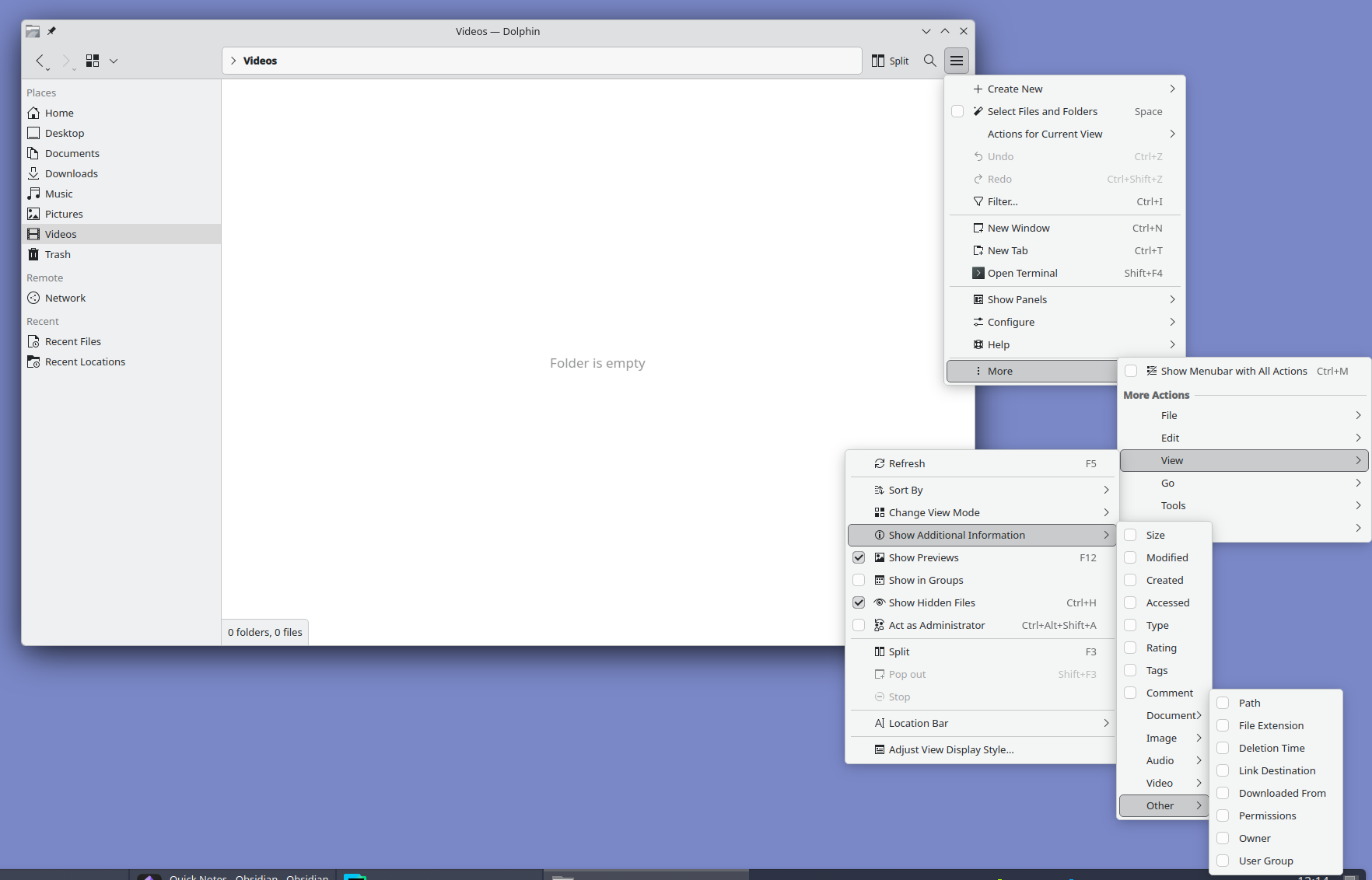
Look at it and tell me this is normal. I love Plasma but oh man do they need to hire a real designer. Someone with balls to unfuck the interface and move all advanced settings out of GUI into a well documented config file.
lunar_rover
> What else do you want?
No alignment issues, menus sorted by professional designers, easier to learn UX like ribbon menus and a lot more.
Feel like the design issues stem from it being shaped by existing power users. Familiarity tend to downplay design issues so stability took priority, even though the UX never should've been stabilised in the first place.
dddgghhbbfblk
I recently installed Fedora with KDE Plasma on a new computer and I can't say I feel the same way. The UI is still clunky (eg the file explorer is clunky) and I'm running into minor bugs pretty regularly. Windows will be sized incorrectly after a restore sometimes (failing to take into account the bar I added at the top), switching between multiple windows of the same program and a separate program seems non-deterministic, random UI components occasionally crash and restart.
I don't want to be negative for the sake of it but I constantly read these really positive comments about Linux on the desktop (in general or in specifics) and it gave me a false impression of what to expect. Not the first time I've fallen for this either over the years.
WD-42
There’s a reason GNOME is the default for most of the major distributions.
306bobby
I've had twice the issues with GNOME as I have with KDE or Cinnamon
I think it all really depends on the wants and workflows of the user
undefined
alpaca128
It's rare to see a perfectly stable desktop UI in general. Even on my Mac and iPhone minor bugs are almost a daily occurrence. But KDE especially is a combination of huge scope and limited resources, whenever I used it there was always something obviously unpolished.
GreenWatermelon
And I much prefer "unpolished due to resource constraints" to the outright malice that is windows.
simonask
Just did recently. I remembered KDE as flexible but cluttered. It’s still flexible, but they really cleaned up nice!
AnonHP
How is it on older or budget hardware though? It’s been a long time since I tried KDE, and in between even worked with Xfce because Gnome was a bit more resource intensive. Is it still the case that in terms of hardware specs and demand of the hardware, KDE needs/uses more than Gnome? I guess Xfce will be in a different league capability wise and resource requirement wise.
yjftsjthsd-h
AIUI, they actually really made an effort to improve on that front, to the point that KDE is actually really good about resource use these days, which is eg. why it was picked as the default for the pinetab 2.
hedora
I use LXDE on my new boxes, but on a 15 year old machine I wasn't sure what the Linux distro had defaulted to. I was surprised to see it was KDE. That machine takes 30 sec to decrypt the disk encryption key (stupid proof of work functions!), but the desktop environment is as snappy as LXDE on high-end 2026 machines.
I haven't compared those two with XFCE recently, but they all seem fine these days.
71bw
> That machine takes 30 sec to decrypt the disk encryption key (stupid proof of work functions!),
I think my Ryzen 7500F takes a similar amount of time and it is, by no means, old nor underpowered.
hnlmorg
I’m running it on a ~15 year old Intel NUC.
It’s got 4GB RAM and a modest Intel i3.
KDE runs flawlessly. While modern web browsers struggle with more than a few tabs open.
bpye
I run it on my RK3588 based MNT Pocket Reform. I have to force the GL ES 2 backend because of, presumably, Panfrost bugs, but otherwise it runs well despite the fairly weak CPU and GPU.
pabs3
Running it on a dumpsterd PC with a 2013 Intel CPU. Works fine.
ryukoposting
How old and what budget? I spent a good chunk of the late 2010s rocking Plasma 5 on a machine with a first-gen i5. It 8 GB of RAM and an SSD, which probably helped, but it ran great!
dvdgsng
If that counts for you, but I've just used it with CachyOS on a 2017 XPS with no issues and performance was great.
monegator
define older? no problem on my 2012 macbook
arendtio
Pre-Plasma days? OMG, that seems like a really old version, like KDE 3.x?
iberator
its awful. using computers since win 3.11
cromka
I did, but I don't share the sentiment. Moved this year from macOS and KDE is over-engineered with little thought put into the UX. For example, try to take a screenshot. I was quite literally shaking my head for good couple minutes looking at this abomination. It's so extremely confusing, all over the place, bogged down with tons of switches, modes, it's like you need to spend 30 minutes to understand how this thing works and all the Whys. Took me couple days to realize it was an actual Photo app in its screenshot mode. If only they spent some of their increasing budget on some proper UX usability testing and not rely on their people's gut feelings and a "that'll do" mentality...
Meanwhile, Gnome just works exactly like you'd expect it to. I said it before already, but Gnome is for people moving from macOS and KDE is for ex-Windows veterans. And, for the record, I don't want to praise Gnome's overly-minimalistic approach, either, which too gets annoying when you have to find an extension for every stupid extra setting beyond the defaults. But, all in all, I much prefer it over KDE and wouldn't switch back. Not to mention the aesthetics, because there's no comparison if one shares the Apple/Braun ideals on design.
A plot twist here is that I am also a KDE app developer...
tapoxi
I just hit printscreen and save, I think you may be confusing your familiarity with a system with user friendliness.
For comparison, MacOS doesn't have a printscreen key, it's command-shift-3 or command-shift-4. Much more confusing to newcomers in my experience.
cyberrock
Spectacle used to just let you automatically save with no confirmation dialog, then they changed that a year or so ago. Maybe it's still possible to configure it but I was less than happy to have my default changed.
71bw
It's a bit slow for me, in my experience. Sometimes doesn't want to copy the image to the clipboard. Saving is also wonky. Really wish I just had sharex on Linux
F3nd0
What Photo app are you referring to? On Debian Trixie, I just get the screenshot app, Spectacle. It shows the screenshot it just took, tells me where it’s been saved, lets me do stuff with it, and lets me take another one. It could do with a facelift, but it’s fairly clear, really. I wonder if they changed it later or if the distribution you used deviated from the defaults.
bscphil
I believe they changed the app since Trixie was released (Trixie has KDE 6.3, the changes were in 6.4) and buried a lot of the really common settings behind menus. E.g. you might want to take a screenshot on a delay, and that's now hidden behind a menu whereas they used to surface the most common features on a panel.
jasonjayr
I'm on Debian bookworm, and a screenshot is one Meta-Shift-S -- I just highlight the region I want to capture, and I get a dialog prompting me to (with one click) copy to clipboard, save to file, or annotate. There's a handful of out-of-the-way options as well, depending on what exactly you want to do. What's --- so abominable about that?
djfergus
Why does it need a dialog? Just save the file AND copy it to clipboard. If user wants to annotate they can paste or go get the file.
cromka
OK, do me a favor and switch over to Gnome and try there. You'll see what I am talking about.
fxde
I don't get how this can lead to confusion. You can hit PrintScr, draw a rectangle and hit save, or enter "screenshot" into the bottom left menu, rectangle, save. There you can also see the common options with shortcuts for "Full Screen" etc, at least on openSUSE Tumbleweed. I would assume that is the default behaviour.
bee_rider
The nice thing about Linux is that there’s a DE or WM for everyone. Personally I can’t imagine running a whole desktop environment when all I want is to draw some windows and a status bar. But, to each their own!
EnPissant
I really like KDE plasma, it's the best DE out there once configured to mimick Gnome 2 / Mate, but I agree with you on screenshots! Also, Konsole required much configuration to be not way too busy.
Other than that I don't have too many complaints.
cromka
I am absolutely certain they're headed in the right direction, but even some minimal Usability Testing would give them tremendous amount information on all the low-hanging fruit they could fix/optimize and substantially improve the on-boarding for newcomers.
himata4113
What are you talking about, spectacle is everything I want in a screenshot tool and I do not want it to be any other way. If you want something that just takes a picture then you might as well go back to 2012.
rjh29
You can just change the screenshot program you use, it's a keyboard shortcut. Flexibility and customisation is the best reason to use Linux after all.
cromka
Except that's exactly my point. You come to that DE, you don't want to modify and optimize every single nook and cranny. I mean sure, some do, but this is a vast minority. If Linux is to become truly popular desktop, it needs DEs like Gnome, aiming at those who are just fine with all the defaults curated for them.
jrm4
At the risk of whatever, I feel like there might be a "market" for something like the "OpenBox" version of this - or perhaps what I'm saying is even using something like Openbox to get the minimalist version of this thing.
Seems to me a 10-foot interface almost by definition doesn't need the complexity of a KDE; you need to launch apps from "big rectangles on the screen" instead of like a Start Menu(and probably configure those to be 10 foot friendly) -- and MAYBE a few widgets and that's it.
I've always wondered why that doesn't seem to exist, and now probably with vibe coding may just work on it myself.
ritlo
Build it on Retroarch and you don’t even need X/Wayland. And the menu/launching functionality is done, you’d just be making a theme for it.
Really if someone made a WebKit “core” and a Jellyfin client “core” (which, actually, you might get “for free” with the browser if you can tolerate web bloat on your platform) under libretro it’d be a pretty damn capable set-top-box UI. All the “cores” right now are games/emulators, but they don’t have to be.
jrm4
This is a very interesting take -- I wonder how it would deal with web browsers? I'm curious because I actually did try to add firefox to my Steam Deck as a "game" and it couldn't deal with multiple windows?
ritlo
Writing against libretro, I think you’d basically just draw on whatever surface libretro provided you. In retroarch booting on the Lakka distro (for example) this would ultimately draw using Linux Direct Rendering Modules (no X or Wayland). Last I checked that distro could cold-boot into Retorarch ready to accept input, on an RPi2, faster than most modern TVs wake from sleep, which is nice (I wanna say it was under 3 seconds). But you wouldn’t have a windowing system, you’d need something that could draw buttons or menus or something on a surface. Libretro’d also take care of mapping input, but you’d still have to handle it. Not sure if it provides a network interface or if you have to reach outside it for that.
Aside from most emulators of note having been released as a libretro “core”, the sole non-game core I’m aware of is some kind of ffmpeg video player. If things like 3d console emulators and ffmpeg can draw to the surface that libretro provides, doesn’t seem like it should be insurmountable to get something like WebKit rendering content there (I briefly looked into doing this with Firefox years ago but found it’s hellish to embed—chrome’s a little better, but it’s chrome and heavy as hell. WebKit seems to me like the most promising engine for such a project, lighter than the other two and relatively embedding-friendly). Get that working, and the main remaining hurdle would be getting an overlay modal menu or something like that working to allow interaction and drive the engine.
ducktastic
I'm totally with you on this and a great idea. Always used flux/openbox whenever I could on my own workstations, and the idea that it could be used for a big screen device would be great.
iririririr
and after you launch the app, then what? are you rewriting chrome or firefox?
regular kde is usable enough on my tv from the couch, just bump font size and 200% scaling. done.
these ideas are reminiscent of a time people thought kiosk modes were a good idea.
what one call complexity most people can being able to do anything at all.
jrm4
I have no idea what you're getting at here; I already use firefox from the couch?
Imustaskforhelp
Joe's Window manager might be a better choice than Openbox (imo) if someone does want to work on it.
Maybe FLTK/FLWM can be interesting as well.
ehnto
Super cool, I have been extremely pleased with my switch to KDE. I have used MacOS as a daily, I have used Windows 95-Win10, I have used various linux distros all for long periods of time at work and home.
KDE Plasma has really hit the sweetspot for me, it's super usable daily and still has easy customisability. Thanks to all the effort poured into Proton I have even replaced my gaming PC with Arch/KDE plasma with really very little stress.
I am VR gaming, on linux, on AAA titles, with no messing around, if this isn't the year of linux desktop then it will never be.
ajot
Of note: Plasma Bigscreen was sort of revived and rejuvenated last year by a Plasma Mobile dev
atoav
If you have regular KDE I urge you to just shake your mouse vigorously for ca. a minute. The cursor has this mouse finding feature where the mouse cursor gets bigger if you shake it. It can get comically big, like fill the whole screen big.
One of the best features I have ever seen.
wao0uuno
I discovered it yesterday by accident. Not the feature but the fact the cursor just keeps on growing and growing. Kinda funny but also possibly a bug.
DiJu519
What kind of "Remote" would one use to mimic say an Android TV box or normal cable company Set-Top experience?
PufPufPuf
I have this one, acts like a mouse (gyroscope) and keyboard (arrows, back, home, vol+- on the front side, almost-full qwerty on the back).
drnick1
My suggestion would be an airmouse remote, possibly with an built-in keyboard. This is because sooner or later you will want to use a web browser to stream content, and a mouse is incredibly convenient for that.
JoshTriplett
There are many bluetooth remotes you can use for this. You may want one that has a built-in keyboard, or just one with arrows and a handful of buttons.
lynndotpy
This is listed on the linked page. KDE makes the excellent KDE Connect. You can also use a TV remote, game controller, or keyboard and mouse.
accurrent
I use kde connect with my android for my htpc. Works nicely enough on stoxk kde.
haunter
Unified Remote with my phone https://www.unifiedremote.com/
suprjami
Look up "USB RF remote" on eBay. There are two common ones you'll see everywhere. I have one for my Kodi system.
herzzolf
If your HTPC supports HDMI-CEC, it will just pass-through the inputs from the TV remote, no additional ones required.
em3rgent0rdr
Too bad can't access $CorpStreamingVideoService full-resolution on linux :(
drnick1
Get your videos from other sources.
godelski
This is really cool and I'd love to see TVs ship with it. There's a lack of innovation these days and I think the only way to bring it back is to recognize that computers are environments and people need to be able to build on them. With TVs becoming more powerful this could be a big win.
Make it easy so my aging tech illiterate parents can use it (looks like it does the job, at least as well as any other) but also hackable for people like us, to fix bugs and drive innovation.
My TV is currently a monitor for my computer, so something like this even works for me in the same way steam big picture does. For work, I ssh in. One thing that helps is I use ydotool and my phone and laptop can easily be a keyboard
while_true_
"Plasma" is an awkward name for a television app. First image that comes to mind is the old plasma 50-inch I used to have. Damn thing weighed nearly 100 pounds and was really power-hungry.
hnlmorg
“Plasma” isn’t the name of the television app. It’s “Big Screen”.
“Plasma” just refers to the desktop environment: https://kde.org/plasma-desktop/
So this is a “Big Screen” UI for KDE Plasma.
account42
Plasma was also a stupid name for the DE, especially when it already had a better name that everyone knows.
cheeze
I loved my Plasma TV.
Bought it as an intern dirt cheap off of some dude at my company who posted it in a email group. He upgraded to the latest and greatest and just wanted it hauled out. Picture quality (for the time) was incredible!
It also doubled as the worlds best space heater. My god it was power hungry.
64738
Yes! I still use my Panasonic 50" plasma as my daily driver. I still love it, it's an amazing TV :D
Get the top HN stories in your inbox every day.
Just to manage expectations: Big Screen is a fairly old project at this point, that has always had a relatively small number of people showing it some love (though I understand recently there's been an uptick again). This is not a new product announcement from us, nor a key focus of the community. That is not the disparage the work being done there in any way, but this most likely isn't quite Kodi just yet.