Get the top HN stories in your inbox every day.
loufe
bayindirh
I never had Bluetooth connection issues with my Logitech hardware, but I wanted mine to work without an OS (i.e. with a Bolt receiver).
Solaar handled the pairing in 30 seconds flat, and I can't be happier. The only thing is, since Bolt doesn't look like proper BT to the OS, battery levels can only be monitored from Solaar itself.
throwaway314155
What's a Bolt receiver?
resoluteteeth
Bolt is logitech's newer wireless protocol (with devices using a dongle rather than bluetooth) that's supposed to be more secure than the older one.
akira2501
Bluetooth Low Energy with some Logitech sauce added into it. Apparently encrypted and marketed for use in contexts where FIPS level security would be required.
nine_k
A type of USB wireless receiver: https://www.logitech.com/en-us/products/mice/logi-bolt-usb-r...
hnuser123456
Logitech's might be a large download, but their Windows software still seems far more optimized than Corsair's. After a few days of uptime, Corsair's processes would have nearly an hour of CPU time. Logitech's would have a couple minutes at most. I replaced all my Corsair equipment with Logitech or others after seeing that.
myself248
Why does a mouse need an app, again?
bayindirh
To be able to program all the configurable buttons, and upload the macros and settings to the profiles present on the mouse itself, so you can use all the features of your mouse, tailored to you, even if you don’t have the software on the target device you’re using your mouse.
Yes, Logitech’s high end mice store settings themselves. The app is just a programming interface. It sometimes does per program profile switch, too, IIRC.
juancb
Because there's a computer in your mouse and you need software on your host computer to talk to and peogram the mouse's computer.
That of course would make it optional like with most programmable keyboards but then there's the need to manage pairing via their wireless dongles and then it quickly becomes necessary.
Outside of it all being intentionally proprietary I don't see why they couldn't take an approach similar to VIA in managing their devices. There's also prior work for flashing microcontrollers from the web browser, I'm thinking of ESP32s specifically.
dmonitor
reprogrammable buttons, adjustable dpi, customizeable lights, etc
dghlsakjg
It doesn't need the app. You can use their stuff without it.
If you want to use some of their more advanced features, you need to use the app.
For example, I have it setup so that if my macbook is on, I can push my cursor to the far left of my windows screen and my mouse will automatically switch to the macbook bringing along anything in the clipboard.
HeavyStorm
My mouse have loads of features like programmable buttons. I don't think it should be memory resident - probably could work by opening, configuring, saving to firmware and shutting down, but at least its existence is justified. Wasn't it shit, I would be OK with it.
dmd
So your mouse driver can have AI in it, apparently. https://www.logitech.com/en-us/software/logi-ai-prompt-build...
bigstrat2003
To be fair, it doesn't. I have Logitech mice and I have never once installed an app for them. They work great just with normal USB HID drivers.
happymellon
To pair the mouse with the Universal Receiver/Bolt dongle rather than Bluetooth, and then to expose the other APIs such as battery levels.
sirsinsalot
I found the Logitech software absolutely horrid, and a massive resource hog. There was weird agent software hogging CPU and using memory.
Also, why does my mouse config software need AI features? Uninstalled.
brewtide
Same. It also, on install, turned on a feature letting me know caps pick on/off every time I hit it ,but on the screen. It drove me nuts until I finally realized it started after installing...
My new mouse. No need Logitech. It's a mouse.
sebazzz
Bruce Dawson has a blog post about Corsair. Apparently their processes constantly leak handles.
LeoPanthera
> surely sending a torrent of unnecessary telemetry data back to Logitech
To give Logitech some credit, there's an off switch for "diagnostic data" right there in the settings.
bigfishrunning
If they want more credit, they should make it an on switch
shiroiushi
For even more credit, they should leave all the extra telemetry and other crap out of the download, so it's only a megabyte or so, instead of 150MB, and let people opt-in to downloading that junk.
rizky05
[dead]
ghjfrdghibt
I think it's implicit that a switch has to be on/off. Do you mean opt-in rather than opt-out?
AyyEye
An off switch that will get ignored for some data, re-enabled on some future update anyway, and forgotten about next time you reinstall.
nox101
IIRC I installed the Logitech software in a VM, programmed the the mouse, deleted the VM.
All I wanted to do is turn off the rainbow LEDs
Next time I get a new mouse I'll try Solaar.
beAbU
Sadly the MX family of mousen need the Logitech Software for customisation. It's not saved on the mouse, so if Logi Options is not running the mouse operates in default state, with no custom button mappings, etc.
SparkyMcUnicorn
I've used the logitech g305 for at least 6 years now, and thankfully that one lets you write a profile to the chip on the mouse.
gosub100
it works fine for me on windows, only annoyance is google maps, switching to street view, one wheel rotation unit acts like 15, so switches back and forth uncommanded to street mode and out
adgjlsfhk1
My one gripe with Logitech mice is that none of their "office" mice support high refresh rate polling.
nextos
With the Linux kernel, USB power savings are also annoying on Logitech devices. If you set everything on USB bus to powersave, their mice and keyboards will go to sleep every few seconds unless there's continuous activity.
I have experience with Dell and Apple keyboards on Linux, and they don't suffer from this issue. The problem is not terrible, but requires a special udev rule to exclude them from powersaving, which is annoying.
jsheard
Also they've been very slow to adopt optical switches compared to other brands, a handful of their high end gaming mice have them, but the vast majority of their range still uses the same old mechanical switches that tend to start erroneously double clicking after a while.
XajniN
The issue is actually the static electricity buildup in the plastic somewhere. It doesn’t happen if the air is humid enough.
So, just turn off the mouse and blow in it a few times. It will work normally for a few days after that.
I found this solution on approximately the 12th page of a Google search ~9 years ago. Every other solution was wrong.
bayindirh
If your mouse starts double clicking, play a game of Quake 3 for an hour, or just click a bit more aggressively for the next hour. It clears the problem, per my experience.
What I understood is, the switches on these mice (I have G700) are practically abuse-proof. However, they don’t like to be used lightly and start to glitch possibly from fine dust. Using the switches more aggressively cleans them up.
My first generation G700 still works great.
ploxiln
The left-click switch on my Logitech G305 started glitching-out after a couple years, particularly noticeable when trying to drag something, the drag would drop randomly in the middle. Disappointing to only last a couple years.
I found replacement switches for $10 on amazon, pre-wired with little plug, easy enough to install with just a micro-screwdriver, no soldering. This problem is common enough that there is a good selection of different switch brands/types available. Fantastic. Not disappointed at all anymore, honestly.
0points
May I suggest you use the bolt receiver instead of bluetooth, and you will have a much more reliable connection.
ninkendo
Using Linux with an MX Master 3S, I see noticeable lag sometimes when moving the mouse cursor around when using the bolt receiver. Using regular Bluetooth gives me no issues.
0points
Parent had this exact issue: > getting repeatedly frustrated with bluetooth connection issues
My suggestion to use the bolt reciever was in response to that.
Why you suggest to me and parent to just forget about it because you have such great experience is depressing to me.
I have the MX Master 3 and MX Keys Mini. Using Solaar on Linux for 2.5 years without a single issue.
I did have more issues using pure bluetooth with an external bt antenna (intel bluetooth hardware).
jwr
That might be true for Windows, on Mac OS I get perfectly reliable connections (years of usage with multiple mice) with Bluetooth. And I don't have to use any stupid dongles.
0points
I wouldn't know.
This thread is about Solaar and i suggested parent try the reciever to resolve their bad connectivity.
You telling us that your macbook is great helps who exactly?
I am a solaar user on arch linux, btw ;-)
orev
This says it’s for Linux, and a search doesn’t find a Windows version. Are you using this on Windows?
loufe
I suppose that could have been clearer. I use Windows on my desktop and Linux on my laptop.
kreelman
Awesome. Thanks for the info here. I have a couple of useful Logitech peripherals too. It should be quite useful.
kdmtctl
I'd love to see this ported to Mac.
Just discovered the bloody AI prompt builder enabled by default in my mouse driver today. After patiently declining input recording permission for months.
Managed to get rid of the most of bloatware using their corporate "Offline" version which supposedly doesn't phone home and doesn't ask for extra permissions. YMMV.
https://support.logi.com/hc/en-us/articles/11570501236119-Lo...
thombles
> AI prompt builder enabled by default in my mouse driver
That's so wild I had to go and look up what that could possibly mean. What a world we live in. https://www.logitech.com/en-us/software/logi-ai-prompt-build...
gosub100
I worked at a fucking air conditioner manufacturer, and sure as shit they had an AI developer. people are huffing some strong shit.
OptionOfT
Logitech implements the forward and backwards buttons on macOS in a REALLY weird way. It simulates swipe events. And you cannot set them to the default Mouse Forward and Mouse Backward (M4/M5). https://superuser.com/a/1216049
On Windows that is what I do to make sure behavior is consistent across applications.
kristofferR
Oh awesome, so that's why Logitech mice work so much better than other mice in macOS. Cool project:
dkmar
Just switched from logi options to Steer Mouse myself.
You can map the buttons and add chords. The only thing it might lack is being able to use mouse movement as a trigger (eg hold the back button and move left to change spaces). Still looking for it
Slitted
SteerMouse really is an amazing focused piece of software. I’ve had it for a decade now and it’s up there with Alfred as a must have. It used to have issues with BTT and Karabiner but it’s been very smooth since it switched to a full app recently.
kergonath
SteerMouse is fantastic. I’ve been using it for about 20 years now.
kstrauser
I switched about a year ago. After about two days of trying it, I was throwing money at them. It's sooooo much better than Logitech's enormous blob, and actually looks/acts/feels like a Mac app. It was totally worth the small price.
KennyBlanken
At least it's not actual spyware.
https://news.ycombinator.com/item?id=29056847
Wacom's drivers collect and send both application and window title names to them. It still does, even after all the outrage.
drdaeman
How on Earth they’re not sued into oblivion?
terminalbraid
But you agreed to it in the ToS when you installed it. You can disable this however (before it was discovered you could not).
guiambros
Yet.
akerr
I use BetterMouse with my MX Anywhere 3S and it does everything I need it to. It’s a few dollars but it has a trial and is available via Homebrew.
cmbailey
I tried all the Logi alternatives for MacOS two years ago and found Steermouse the best. Has been solid through OS updates and has many great features I live by, especially chords.
gbil
Solaar works on Mac with some tries, at least for me the best approach was to get the repo and run the binary directly instead of trying to install it
altomek
Corporate "Offline" version. Yeah it is not: https://pasteboard.co/RN7nDiZfHztb.png - but hey there is also Upgrade Agent that lunches after install, also "Offline" ;P

Do you have problem with your left button after guarantee expires? Here you go: https://www.reddit.com/r/logitech/comments/15yl9ix/fixed_my_...
I just did not figured out how to fix side scroll wheal which does not work on web pages in any browser... and how to fix Logi Agent preventing Windows shutdown each time I shutdown my PC.
Ower 700 MB of crap to spy on you. Can we call this scamware?
kdmtctl
Sorry. Can't comment for the Windows version. At least it doesn't require input logging permission on Mac. I'm OK with upgrade checks but don't want a keylogger. Which is allegedly not.
pxc
Is there anything like this on Windows? Logitech mice are mostly nice, but one of their major flaws is that their macro capability is not onboard but requires some kind of supplemental software like this, so even just binding a single button to multiple keystrokes as a chord is not possible without G-Hub.
Linux has stuff like Solaar and Piper/libratbagd, which is great. For macOS, it looks like SteerMouse does quite nicely, even for mice with many extra buttons. So does G-Hub have any alternatives like this on Windows? It would make recommending Logitech mice to Windows-bound friends and family so much easier.
(My favorite forever for these reasons was Roccat, everything their mice can do they can do onboard. Configure your mouse once and you can purge whatever software you've used to do it if you don't like it, without limitations. But hardware quality control with them has long been iffy, and I think since their buyout by Turtle Beach it will only get worse.)
KennyBlanken
Their major flaw is that they purposefully use shitty switches that fail, sometimes within months. This is true even with their absurdly overpriced gaming mice.
I have never had a mouse whose buttons failed until I bought a logitech. Every person I know raves about them until you ask them how many they've had to buy.
andix
I can't confirm that. I have a few Logitech devices and they are still fine after years of heavy use (mx ergo, and master series).
augusto-moura
Same, been using a MX Vertical daily for almost 5 years now and, aside from flaking off the finish in some places, it works perfectly fine. Battery life is pretty good as well, I think I can avoid using a cable for months
bongodongobob
Nah, I deployed Logitech for ~300 users in a manufacturing environment for years and they were just fine. You got unlucky or are beating the shit out of them.
kergonath
I’ve had a MX1000 (which did not fail but had terrible battery life), a G7 (which double-clicked on the right button after 3 years), a G602 (which just stopped working one day), a G502 (which stopped clicking at all), and a G604 (same).
I won’t claim to be a statistically representative sample, but from my experience their high-end stuff is expected to break after between 2 to 3 years. I kept going back to them because the hardware is very nice when it works. I gave up and bought a Razer Naga about 3 years ago. Hopefully it fares better in the long run.
dicknuckle
Agree. It's rare to find a failed Logitech mouse.
WhyNotHugo
Warranty will often get you a new one. I had a mouse fail about 2.5 years in and they sent a new one.
OTOH, it speaks terribly of their quality; a mouse should work fine for 10-20 years, like some mice from 20 years ago.
amlib
Even 20 years ago mices weren't always that reliable. I used to have a Microsoft ball mouse from the late nineties and I remember the micro switch giving up after about 4 years. Even the replacements (albeit much cheaper/more generic brands) from the time didn't fare better, but at least by that point they were all optical.
And I say "replacements" because they all didn't last very long, until I got the memo and started buying decent stuff from brands like... logitech. And then there is the conundrum of going with something even more "premium" than a logitech, there's very little guarantee it's really gonna last. You may be paying twice as much for it but it still ends up lasting about as long.
Am4TIfIsER0ppos
Like the others I can't say I have had a mouse button crap out on me. My problem is with the mouse wheels but I'm not sure if that is the manufacturer's problem or poor cleanliness on my part.
burkaman
If you don't want to worry about this you can get an Asus mouse that is designed to be repairable: https://rog.asus.com/articles/gaming-keyboards-gaming-mice/g...
jbd0
I bought some switches from aliexpress for my Logitech G203 and replace them when they fail. I've had it for 5 years now.
burnt_toast
Semi-agree. I've had 2 mx525s fail within ~6 months of purchase but I've also had a mx anywhere 2s that I bought used and got 3 years of usage out of it before I had to replace the switches.
I wouldn't buy a cheap mouse from them again.
homebrewer
Three years is below what should be considered acceptable, let alone impressive. I got a bit over ten years of really heavy use out of a dirt-cheap Genius mouse ($3-4) before it had to be replaced, and not because of the switches but because of the physical wear of the case.
okasaki
I've used a G203 ($20) daily for 4 years and it works like new.
brocket
This saved my butt when I lost my mouse dongle and only had an Ubuntu instance available at the time. I was able to pair my mouse to the same dongle my keyboard used and have been using the software ever since without issue. Thank you!
bdavbdav
If you ever need to do this in future, Logitech have a web only tool that uses web serial to pair the receiver.
gessha
Yooo, I've been so frustrated with Logitech! I have an MX Mechanical Mini keyboard and MX Ergo mouse. For some reason they don't pair to the same dongle because the dongles are different and not interchangeable. In addition, whatever dongle is plugged into the right USB-A port of my laptop always lags for some reason. Does Solaar solve those issues?
jerkstate
I've found that using a short usb extension cable with those wireless dongles, rather than plugging them directly into the computer, works loads better and fixed "lag" issues for me. Maybe some kind of EMF interference?
Lord-Jobo
I can partially confirm: 2.4ghz, or at least the common USB mouse implementation, is very susceptible to interference, it's sent me down a few wild rabbit holes with my Basilisk v3
ssl-3
Same thing helps with USB Zigbee interfaces that use 2.4GHz.
It seems most-useful to make sure it is only a USB 2 cable, without the extra USB 3 data lines.
(USB 3 makes a ton of noise at ~2.4GHz. They could have spread out emissions and dialed them down, but they stuck them in the same trash band that microwave ovens [and mouse dongles] use because... well, it's cheaper and easier that way.]
WhyNotHugo
Also, try using a USB2 port instead of a USB3 one.
USB3's high speed produces EM inference with some receivers.
tguvot
there is an interference from usb to 2.4ghz devices
tecleandor
Solaar mostly changes configuration and helps pairing devices, but it's not part of the drovers, so it might not help you. Anyway I dump some info about dongles here just in case, if you find your devices are compatible you might use Solaar to reset the pairings.
IIRC, there are three types of dongles: the old basic ones, that only work with one particular device, the not-that-old "unifying" dongles (they have a red logo with a star or ray of light), and the new ones that are called "bolt" (green logo with a bolt in it).
I have mostly experience with the "unifying" receivers. Those can pair to any "unifying" compatible device, and keep connections with up to 6 devices. Bolt dongles work similarly but with better encryption.
smallerize
I had this happen when the dongle is a little loose in the port. Solved lag with a couple of dongles by sliding a tiny bit of paper in alongside it.
Joel_Mckay
The mouse buttons tend to go long before the keyboard, but wireless HID devices tend to be a consumable for most people that use their computer a lot.
We issue the wireless keyboards/mice kit as it is cheaper than swapping a proprietary keyboard in your laptop, and less likely to give users an RSI (really not funny if you are a Jr and have to learn this the painful way.) =3
nemomarx
why not a corded one, if you'll always be using it with a laptop?
Joel_Mckay
In general, for mobile these can get broken up rather quickly, and increase probability of pulling a laptop off a table.
For servers and desktop towers, a cabled solution is more secure... and never runs out of batteries. YMMV =3
bbutkovic
I have been using this for my ancient MX Master 2s for quite some time now.
I use it mostly to adjust the point where the scrollwheel no longer ratchets and just freewheels (Logitech put an electrically actuated lever that controls the ratchet into their mice), Solaar has an option to tune it, it works amazingly.
Not to mention how you can bind keyboard shortcuts to specific "gestures" using the palm button.
Solaar is awesome, thank you, Solaar devs!
teekert
I only buy Logitech because Solaar exist. It would be nice if they’d get some kickback. I just feel like it needs an AI prompt builder and then it’s finished.
superb_dev
Was the AI prompt builder sarcastic or a serious suggestion? I can’t figure out how any AI fits into my mouse configuration utility
teekert
Sorry, it’s absolutely sarcastic. I thought I wasn’t able to couple my MX Keys to the Bolt dongle and the MX Master 3S to the “Unifying” dongle because I needed Windows (but no, it’s by design!). So I grab my wife’s laptop, install that Logitech garbage and it greets me with an AI prompt builder. I was like that Picard Gif, squared. Unbelievable.
superb_dev
It seemed so ridiculous that I thought it must be sarcastic but you never know with how rabid AI people are. Absolutely insane that they included that in the official software!
mattfrommars
For Linux pros here, can anyone explain how is this, in my understanding, driver implementation for Linux to be completely written in Python?
My understanding is most for driver code is written in C or C++. The 'new' way of developing - the kernel development is in Rust.
How can this work that is written in pure Python?
zamadatix
> Solaar is not a device driver and responds only to special messages from devices that are otherwise ignored by the Linux input system.
The normal Linux drivers implement what's needed to receive the HID message. This just handles some vendor specific messages on top of that. A bit like how a program can send a custom vendor specific TCP message on top of the existing OS network drivers without having to itself be a kernel level network driver.
indymike
From the second sentence of the readme:
Solaar is not a device driver and responds only to special messages from devices that are otherwise ignored by the Linux input system
Sounds like this isn't working at the kernel level.
gosub100
for a more general answer, if you rewind the clock back to the 80s and early 90s: a hardware device required setting a COM port or IRQ, which was often done by physically setting jumpers on the device, and the user was responsible for making sure that, e.g. IRQ21 wasn't already being used by the BIOS or another device on the system. Then, you'd install a device driver that knew the specific memory addresses to read/write to in order to communicate with the controller on the device, based on the proprietary way the company decided to do it.
fast forward to today, and the hardware industry has made great advancements in standardizing how devices operate. memory-mapped I/O allows the OS to treat many device drivers the same, they just need to handle manipulation of the memory after it's read/written. for USB, the industry standardized on device classes , so something either acts like a communication device (serial port, JTAG reader), an audio device, a video capture device, or in this case, an HID (human interface device). So based on the general characteristics of how the thing operates, the kernel can do 80% or more of the driver development for you. especially because of the linux credo that "everything is a file"
you plug in a usb dongle and you get (hypothetically) a few files called /sys/class/hid/<serialnum>/{control, data}. so you could, say, change the RF channel of the dongle by writing a very specific value to the "control" file, which will get sucked in by the kernel and sent to the device. Or you could get raw kb/mouse data by catting the .../data file. this would in theory, allow you to write a device driver in python by connecting the .../data file to a read handler, processing the input (the hard part, which requires reverse engineering), and emitting the corresponding output, such as the OS command to move the mouse or generate a keyboard event.
I made some generalizations here, but this is the main idea.
dicknuckle
It's a manager for the device's extra features, and pairing of dongles since that's not handled by the OS. It replaces a few of the typical Logitech applications that normally do this.
wyager
Probably they used LibUSB bindings or something
prmoustache
Pardon my ignorance but why would you need an app to manage keyboards and mice in the first place? Aren't they supported out of the box by generic drivers?
rostigerpudel
Most Logitech devices have settings for particular parameters that are not covered by generic drivers. E.g on my MX Master, I can set what events the buttons (it has 6) will generate. My K810 has borked function keys (they trigger special events instead of just being good old F1). You can switch these back to standard function using software. Edit: typos
p_l
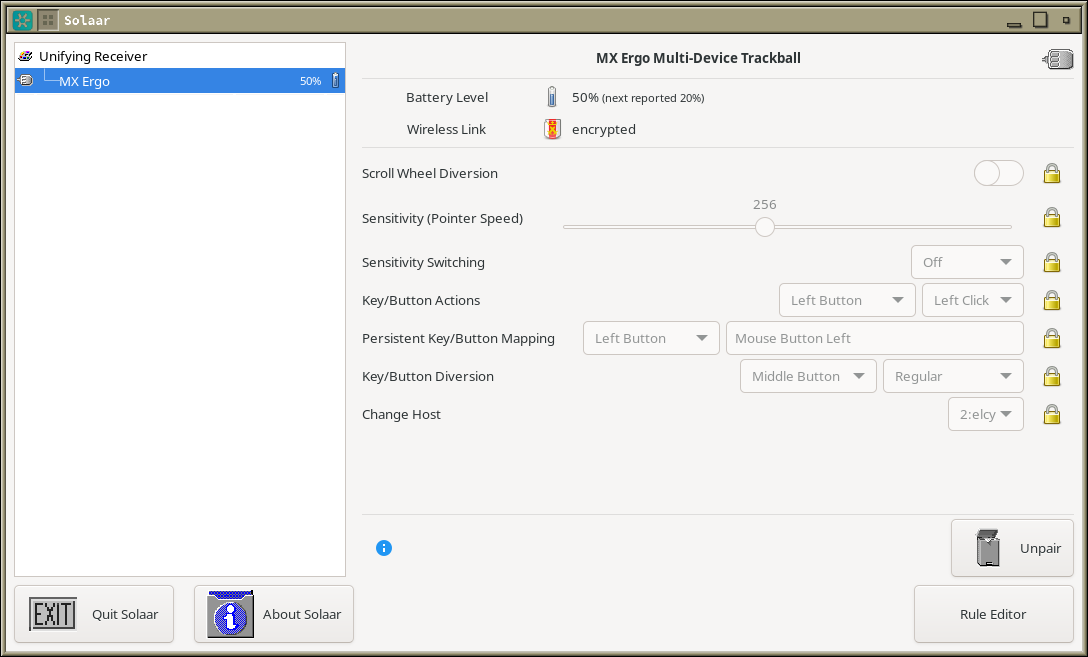
Essentially Solaar is open source interface to few extra features (exposed as application custom hid use pages) of the Logitech "HID++" stack (aka Logitech "dongle", sometimes also combined with bluetooth support on the actual device).
Consider this screenshot[1] of additional options on Logitech trackball + ofc pairing control
[1] https://usercontent.irccloud-cdn.com/file/2cZcZiNk/image.png
Hemospectrum
Some of them have software controls for hardware behavior (like optical sensor polling rate and scroll wheel clutch mode) that no OS has built-in support for, because these features are not part of the USB HID standard.
rostigerpudel
Also, working Linux software to pair new devices with unifying receivers is great to have.
pknomad
Fair question.
In general, custom configuration on both mice (DPI, refresh rate, etc) and keyboards (tactile response settings [See https://wooting.io/], hot binds, etc).
It's a nice to have (almost to the point of necessity) especially when you go to LANs and need a consistent way to load your settings on a computer that's not yours.
skyyler
They are supported out of the box by generic drivers!
But most Logitech devices have settings that can be changed. This allows you to change them.
Using this software, I disabled tap to click on my K400 Plus’s trackpad. Super useful.
Joel_Mckay
In most cases, most usb wireless hid-devices auto-bind on most linux distros, but some models of mice/keyboards do require wireless pairing after a battery change (they may or may not be Bluetooth.)
It is an "install if needed" utility if your mouse seems dead after a battery change or wireless power cycle. =)
dandellion
I used to have a Logitech mouse that allowed you to reconfigure some buttons to use shortcuts and things like that. Plus it lets you see if the battery is running low, which I don't think the out of the box drivers do. But for basic mouse use you don't need it.
schainks
Been using this for years, works exactly as advertised, no issues. Thank you Solaar team for your work and dedication to this useful project!
bnycum
Been using Solaar for a few years with a Logitech K400 keyboard with the built-in touchpad. Running on a Raspberry Pi connected to my TV. No issues and works very well. Have never even connected to Logitech's software on a Mac or Windows.
jklinger410
Flathub version here: https://flathub.org/apps/io.github.pwr_solaar.solaar
rafaelmn
One thing I'm kind of surprised by is that the custom mouse space is so empty, compared to custom keyboard scene.
I would like to have some custom micro controller/ZMK based mouse that I can pair with say my wireless split keyboard. Logitech has OK hardware but they don't have basic functionality like sync switching between devices - this would easily be handled by OSS firmware.
mmazzanti
I've wanted the same for a while. I think there are two main restrictions:
- Mouse bodies are harder to make, since they generally have more complex curves compared to a flat keyboard. 3d printing helps a lot, but you don't get the same durability or quality as injection molding
- Mouse sensors are strangely hard to find. The "good" sensors on a lot of the high-end mice are difficult to find as individual components. From a quick look at what custom mice exist, they'll often cannibalize an existing mouse for components rather than order things from say DigiKey, like you can for keyboard components
Get the top HN stories in your inbox every day.
I've had an MX Master mouse (the "2" for maybe 8-9 years then the "3" for 2-3 years now) and love it. Great performance, great battery life, fantastic design and feel. On Windows I definitely do not love the 150Mb program to manage it (surely sending a torrent of unnecessary telemetry data back to Logitech.
I found Solaar a couple months ago after getting repeatedly frustrated with bluetooth connection issues. It really is exactly what it needs to be. Better interface than Logitech's, simple, lightweight. Devs have my thanks; what a great show of the goodness of open source software.