Get the top HN stories in your inbox every day.
kmarc
woolion
I wholeheartedly agree, but the frustrations are quite understandable. If you want to do something somewhat advanced and you have to care about Jack, Alsa, and then the Pulse or Pipewire layers, it's quite overwhelming (why would you have to know the Linux audio history to work with it).
PulseAudio was quite buggy when it was considered ready for general public by Ubuntu. I kept using some scripts to do what it could theoretically do for 2/3 years, and then it didn't have any quirks anymore.
Now that it is replaced by the pipewire stack, audio bugs are back. For instance, on a laptop if system audio is set to 'output' instead of duplex, switching between speakers and headphones does not work, and volume change would sometimes get stuck. And sometimes it duplicates the streams on another system, which can be solved by killing the daemon.
Even with this less stable state, I agree that this is nothing compared to how bad the situation is in Mac or Windows world. In the professional environments I've been in, basically all people have given up on the system properly switching their device parameters correctly. So calls often need a few minutes to reconfigure audio. Same with external screen switching.
undefined
kristopolous
For me it's been nothing but problems. The primary reason is I'm probably doing things that (almost) nobody else is doing but I assume both countless people are and it should be working fine. Once I hook up some midi devices, want things to be recorded, run a synthesizer stack through pw-jack, expect the midi clock to go down the USB bus, etc, all kinds of interesting behavior starts happening. It even completely locked up my machine a few times. Like hard freeze. I had Audacity just nope right out. It somehow corrupted the local configuration and I had to blow it away to get it to start up again.
And then there's the whole new suite of programs you have to learn where their implementation is constantly in flux so the documentation isn't exactly accurate. pw-record for instance. That "--list-targets" option it tells you to use is long gone (that princess is now in the "wpctl status " castle). You gotta check the date of everything written online because the month it was written matters. It's still far from great.
I used an Amiga about 30 years ago to do similar things. Now that was something that genuinely just worked. People are still using it. That's how functional it was.
But like all these things, I should find the motivation to shutup the complaining and get to cracking on the code to make it suck less.
When it comes to linux and things are broken, your assumption on how many people have seen it and who is working on the section of code it's caused by is invariably an order of magnitude or two too high. That's why you can't find any fixes on the web. You're one the first to see it. Exciting, isn't it?
opyate
It would be helpful if folks on here who say "works for me"/"doesn't work for me" would indicate which flavour/version of Linux they use.
Some distros don't have the latest pipewire stack, and you're left to fend for yourself, having to follow some incomplete or poorly written blog post to side-step what your distro does and put pipewire on top.
Me: Ubuntu 24.04 LTS, and happily using carla, ardour, lmms and a bunch of midi devices with pw-jack. (I'm aware pw-jack is not required anymore, but that was my old workflow, and it speaks to the backwards-compatibility that the stack offers.)
kristopolous
Understood but I thought it was clear at least from my post that this isn't a distribution problem. I've certainly tried the distribution version, building from source, and various other things.
I have a counter-request: It's really frustrating when people are like "It just works! I had no problem! It's so easy!" in response to someone who has clearly struggled to get things working. It'd be like someone telling you they just had a car crash from a mechanical failure and you responding "Well I didn't! I drove home just fine!"
Instead, if you're going to respond at all, something like "I'm sorry, don't give up. I hope you figure it out" would be nice.
aa-jv
Would you use a distribution that doesn't prioritize the use-case for which you intend?
Use a Linux distribution that is intended for professional audio use.
>Once I hook up some midi devices, want things to be recorded, run a synthesizer stack through pw-jack, expect the midi clock to go down the USB bus, etc, all kinds of interesting behavior starts happening.
On Ubuntu Studio [0]/[1] - this Just Plain Works™, you know. I've been doing exactly this for years on my Ubuntu Studio machine, and I just don't have any of the issues you've encountered.
[0] - note that ubuntustudio is a metapackage you can install on most Ubuntu instances, which will set up audio for professional use.
[1] - see also, Zynthian: https://zynthian.org/
Pinus
I’d say a lot of the complexity comes from the fact that there are at least four things — Jack, PulseAudio, Pipewire and the ALSA userland stuff, which the article fails to mention — that try to solve more or less the same problems (probably less, in the case of the ALSA userland). Add to this the fact that everything can be, and often is, run as a compatibility layer on top of (or below) everything else, and the naïve user who just wants to get some music though the speakers can be excused for feeling a bit dizzy.
bux93
I'm sure the windows audio stack is many times more complex, and it's pretty opaque.
OEMs also love to include all kinds of audio related bloatware, which makes getting audio hardware to work reliably(!) quite challenging. The HP laptop I'm typing this on has an "Intel microphone array" (just 2 mics) which has it's own intel drivers, but there's also some HP control panel, realtek and 'sound research' branded stuff, Fortemedia SAMsoft effects(?), Intel smart sound...
If I'm recording seriously, I usually just go to the device manager (devmgmt.msc) and disable as much as I can and enable devices in a trial-and-error way to see what the minimum is to get audio to work again. Otherwise, all kinds of 'enhancements' end up in the audio path.
p_l
Intel Smart Audio is the worst, it takes over normal USB Audio devices and does its own weird processing on top, resulting sometimes with "hilarious" crashes.
And on corporate laptop you might not be able to disable its driver :/
Fortunately, it's too dumb to deal with devices that are behind more hubs than the root one...
hparadiz
If Windows could do what Linux can out of the box VoiceMeter would not exist.
simoncion
I assume you meant VB-Audio's "Voicemeeter"? If so, yeah, that's solid software, and it's NUTS that Windows hasn't made it unnecessary yet.
(For those who may be reading this comment and wondering what the shit this software is, go give it a look. (I use it regularly and don't do Pro Audio stuff... I just want to be able to independently adjust relative volumes of groups of software (like Voice Chat and Video Games).) If the software's feature set looks intriguing, do give it a try and use Voicemeeter Potato. IIRC, all "flavors" of Voicemeeter have the same trial period, and I can't think of any reason to not use the the "flavor" with the most knobs and interconnects.)
boffinAudio
100% agree with you.
I have had a Linux-based DAW running in my studio, alongside the requisite MacOS and Windows machines, for decades now. It runs Ubuntu Studio, has superlative audio performance (72 channels of digital audio), and is a rock solid workhorse for doing large edits on tracks.
The key to it is in using Ubuntu Studio, which is a well-tuned distribution focused on superlative Audio performance, and to choose your hardware wisely. In my case, its all Presonus - because they have been Linux-friendly for a long time - and it easily delivers latency numbers that outperform even the Mac in the room.
JodieBenitez
That's the very first time I read "sanely-working-out-of-the-box" about Linux audio. I have a very different experience of course, such as "why do my BT headphones suddenly play everything at 8000hz sampling rate while I never asked for this and why the UI won't let me switch it back to 24khz ?".
jcelerier
This happens exactly the same for instance on Mac or Windows with BT headphones, it's simply a fact of Bluetooth. If at any point you open an app that accesses the microphone of the earbuds / headphones, the format will downgrade from high-quality, playback only BT profile to a low-quality duplex profile. There's no high quality duplex audio profile in the Bluetooth protocol yet afaik, and certainly not implemented by any vendor. Just do t use Bluetooth if you care about sound quality is the answer.
JodieBenitez
Never had such issue on MacOs with the same headphones and the same apps running.
fulafel
Sounds like HFP. For me on Ubuntu you can choose between audio playback profile and HFP in the sound settings ui, but maybe you have an app running that is changing that setting.
(Apologies for injecting advice into a grumbling thread)
JodieBenitez
No need to apologize, advice is good. Even if for now I'll keep Linux at what it's best: servers.
shrimp_emoji
BT headphones? BT is false dharma. Mobile shit. RF headphones work great on Linux because RF is true desktop dharma.
Joker_vD
Well, I am glad it works for you. My Ubuntu setup at work, on the other hand, has recently picked up a habit of randomly switching to "Family 17h (Models 00h-0fh) HD Audio controller" which has nothing plugged into it instead of my actual headphones.
f1shy
I’m trying right now to connect a BT speaker to a RPi, while using mpg123 as a player. At least from the command line, it is all but easy. And I do not think what I’m doing is not the most basic scenario.
Right now after coupling I have to restart mpg123.
bigstrat2003
I mean... it should work of course, and if it's not working for you then improvement is needed. But anything involving BT is most definitely not the most basic scenario. The most basic scenario is "plug speaker into sound card".
probablybetter
The "mess" of Linux audio is due to ONE reason: single-client ALSA driver model.
every other layer is a coping mechanism and the plurality and divergence of the FOSS community responds in various ways: - Jack - PulseAudio - PipeWire
I am unclear why Jaroslav Kyocera chose to make ALSA single-client, but Apples CoreAudio multi-client driver model is the right way to do digital audio on general-purpose computing devices running multi-tasking OS'es on application processors, in my opinion.
Current issues this article does not address that actually constitute large parts of the "mess" of Linux Audio:
- channel mapping that is not transparent nor clearly assigned anywhere in userspace. (aka, why does my computer insist that my multi-input pro-audio interface is a surround-sound interface? I don't WANT high-pass-filters on the primary L/R pair of channels. I am not USING a subwoofer. WTF)
- the lack of a STANDARD for channel-mapping, vs the Alsa config standards, /etc/asound.conf etc.
- the lack of friendly nomenclature on hardware inputs/outputs for DAW software, whether on the ALSA layer, or some sound-server layer. (not to mention that ALSA calls an 8-channel audio-interface "4 stereo devices")
- probably more, but I can't remember. My current audio production systems have the DAW software directly opening an ALSA device. I cannot listen to audio elsewhere until I quit my DAW. This works and I can set my latency as low as the hardware will allow it.
this is the thing: more than about 10ms latency is unacceptable for audio recording in the multitrack fashion, as one does.
miki123211
> The "mess" of Linux audio is due to ONE reason: single-client ALSA driver model.
This is one of the major reasons why Linux accessibility sucks IMO.
Audio is one thing that you need to "just work™" if you want to get accessibility right, as there's no way for a screen reader user to fix it without having working audio in the first place[1]. On Linux, it does not "just work", and different screen readers have different ideas on how they want audio to be handled. In particular, the terminal Speakup screen reader (with a softsynth) wants exclusive control of your device through ALSA IIRC, while the Orca screen reader for the GUI goes through Pulse. That makes it impossible to use both of them at the same time.
[1] Well, you can sort of fix it by having a second machine and SSHing into the broken one, but that's not what I mean.
codedokode
> the terminal Speakup screen reader (with a softsynth) wants exclusive control of your device through ALSA
If you have Pulseaudio or Pipewire, they add a plugin to ALSA library that reroutes audio to audio daemon, so ALSA applications should work correctly.
lynx23
I would be surprised if Orca did use Pulse directly, it uses speech-dispatcher (IIRC) which then uses PA if configured that way.
Also, Accessibility != Audio. I, for instance, use Braille only. No need for speech synthesis. So equating Accessibility issues wth the crazy audio stack is a little bit too simple.
bigstrat2003
I mean... I've never seen a single audio issue on Linux. It does "just work" in my experience. I realize the people citing issues in this thread aren't just making shit up for the fun of it, but I think there's a lot of going too far and saying it sucks for everyone when it seems to work just fine for most.
tleb_
I disagree.
Applications want to receive/provide a stream (X sample-rate, Y sample format, Z channels) and have it routed to the right destination, that probably is not configured with the same parameters. Having all applications responsible for handling this conversion is not doable. Having the kernel handle this conversion is not a good idea. The routing decision-making needs to be implemented somewhere as well. Let's not ignore the complexity involved in format negotiation as well.
The scenario of a DAW (pro-audio usage) is too specific to generalise from that. That is the only kind of software that really cares about codec configuration, latencies and picking its own routing (or rather to let the user pick routing from the DAW GUI).
vetinari
> I am unclear why Jaroslav Kyocera chose to make ALSA single-client, but Apples CoreAudio multi-client driver model is the right way to do digital audio on general-purpose computing devices running multi-tasking OS'es on application processors, in my opinion.
Because ALSA is a different layer in the audio stack than CoreAudio.
ALSA corresponds to MacOS drivers and I/O Kit.
CoreAudio (Audio Toolbox / Audio Unit) corresponds to Pipewire / Pulseaudio.
But on the Mac side everyone is OK with using CoreAudio (with the accompanying set of daemons), while on Linux, for some reason, everyone wants to go as low-level as possible, "just open the device file" and is wondering, why something is missing. Because you skipped that, that's why.
jcelerier
> current audio production systems have the DAW software directly opening an ALSA device.
I mean, I remember this being the case for a very long time on windows with ASIO too, which is the only reasonable way to run a DAW with acceptable latency there. MacOS has multi-client but I was never able to get latency as low as fine-tuned windows and Linux systems, and in the end that's what matters - you just use your motherboard's chip for OS audio and your pro soundcard for the actual workload. Pipewire is very close to giving a good experience but there'll always be some overhead - I'm making some art installations running various chains of audio effects on a raspberry pi zero and the difference between going through pipewire even if my app (https://ossia.io) is the only process doing any sound, and going straight to ALSA, is night and day in terms of "how many reverbs I can stupidly chain before I hear a crack".
frabert
My presonus interface allows multiple applications to access it over ASIO simultaneously, while letting regular Windows audio through, at 16 samples of latency. ASIO does not mandate exclusive access, bad drivers do.
codedokode
Single-client model is not bad because it doesn't require kernel to do the mixing, sample rate conversion and they can be moved to userspace (which Windows does these days as well [1]). The less code in kernel, the better.
[1] https://learn.microsoft.com/en-us/windows/win32/coreaudio/us...
dimsuz
Is this planned to be addressed/fixed? (single-client model) Maybe there were previous attempts?
vetinari
No, because there's nothing to fix (at the system side).
Apps should use the right API from the right layer; when they skip something, no wonder they will miss whatever the skipped layer provides. When they do not need exclusive access to the device and want to play nice with the other apps, they should use pipewire/pulseaudio.
For 99% of apps, using ALSA directly is the wrong approach. You don't use IOKit directly in Mac apps either.
codedokode
Pipewire/Pulseaudio install a plugin for ALSA library so that ALSA applications audio is rerouted to audio daemon. So apps using ALSA can work at both systems with and without an audio daemon.
laserbeam
Here's my background
1. I have to modify my audio settings every time I start a call in Teams on Linux because it keeps losing my audio device.
2. In my audio settings UI, half the time I switch my devices the speaker test doesn't work.
3. In my audio settings UI, whenever I switch my mic I hear myself. The mic feedback only disappears 30 seconds after I close the settings UI.
4. My work headsets have a robotic sound (likely caused by an incorrect bitrate or buffer size). I can only use work bluetooth headsets via their dedicated dongle.
This was my default experience on a popular debian based distro. And it mirrors the general experience I see online. Things are unstable and a mess.
I started reading this article and it's embelished with phrases like: "is a professional-grade audio server", "widely used in professional audio production environments", and general language that sounds like a sales pitch. This does not fit with anything I'm familiar with.
I would have preferred a neutral and semi technical approach, with 10% of the buzzwords. As written, I trust nothing.
juujian
That would be your headset being in headset mode. I'm on Debian Testing, and I'm finally able to exit headset mode and use a high quality audio codec instead. I hope that's the direction Linux is heading.
laserbeam
Oh no, it's not. I've swapped modes more than imaginable. And even if it were in headset mode the quality would be inacceptable compared to what I was getting on windows. I even manually tried to change pulseaudio settinga for that device with no luck. And I don't feel like turning this thread into a debugging session. But, like, correctly figuring out reasonable bitrates should work by default.
n_plus_1_acc
1. Is a known Problem with Teams
laserbeam
Yeah, teams definitely shares in the blame there. That one hurts more and I blame both microsoft and linux.
pedrocr
The Teams web app works very well in Chrome. I only miss being able to set a custom background to my video and popping out presentations into their own window. It seems much lighter on resources too, maybe because Chrome does more of the video encoding or decoding using hardware.
Cloudef
Pipewire has pretty much unified the userland linux audio stack (+ supports video as well as bonus). Kernel side it has always been alsa. There's TinyAlsa so you don't have to use libasound to interface with the kernel alsa. (userland alsa is quite PITA)
alexey-salmin
> Kernel side it has always been alsa.
Well you probably didn't mean it in a literal sense, but it was OSS up to kernel 2.4 and 2.6 had both OSS and ALSA
gen2brain
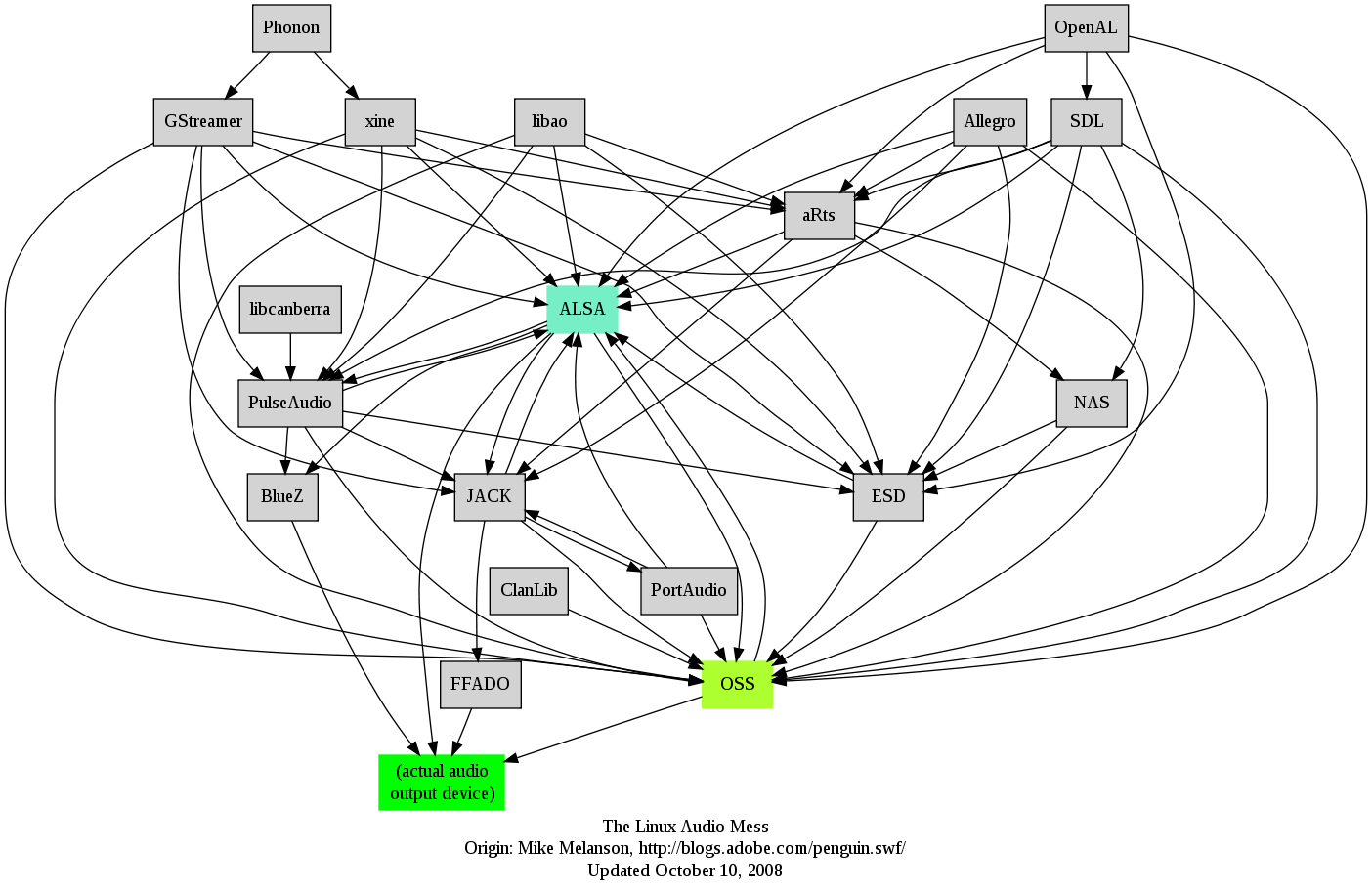
Whenever someone mentions Linux and Audio I always remember this image (made by Adobe I think) https://harmful.cat-v.org/software/operating-systems/linux/a.... It is missing Pipewire but it should be easy to add a dozen of new lines. This is the reason why I simply use plain ALSA without any sound daemons.
pedrocr
That's about maximum mess historically but thankfully most stuff on that diagram is no longer present in a modern install. And that's before pipewire which has further unified the stack.
creshal
Pipewire hasn't really unified anything, it's just pw -> alsa -> hardware instead of pa -> alsa -> hardware for the common case.
And not much has fallen out of use. OpenAL, libao, jack, portaudio, libcanberra, Gstreamer and phonon at least are still used widely, and a bunch of others keep cropping up occasionally in cross-platform software.
pedrocr
My understanding is that pipewire finally unifies JACK and Pulseaudio. You no longer have to decide if you want a general audio setup or a low-latency one, there's a single audio server now that does everything well.
So from that list the unification is now:
- JACK and Pulseaudio are both replaced by pipewire
- OSS is long gone, ALSA is now the only low-level interface
- ESD, NAS, ClanLib, xine, portaudio, allegro and Phonon are not present in the Ubuntu install I just checked
Basically we're down to a unified stack that has BlueZ and ALSA to access actual hardware and pipewire as the single audio (and video) daemon. Everything else is either shims so apps don't need to change interface or cross platform APIs like SDL and OpenAL. We are much better than what this diagram shows.
hawski
Aren't most of the libs you mentioned cross-platform or with a very specific use in mind which have direct analogues in Windows world?
gen2brain
And then there is Pipewire with PulseAudio plugin, and not to mention you can compile Pipewire with support for GStreamer, Jack, etc. I guess we can remove only the Arts and ESD daemons from that list, but the mess just adds up.
undefined
lynx23
Well, we had a lot of layers in Linux Audio the last 30 years. But when PulseAudio was forced into the world by a c-section, with everyone in the LA community already knowing its a still-birth, I kind of lost trust in coordinated project creation. PA makes me so unhappy that I totally uninstall it whereever I see it. Good for me that I am just a console user, because the damn beast is all over the GUI space.
Fact is, RT audio is hard, and the peoplebehind JACK have cared for the underlying problems for a long time already.
Maybe PipeWire, but to be honest, it reminds me too much of PA.
I guess I will stay with plain JACK and SuperCollider as my toolbelt, and not care about PA or PW. Like the grumpy old hacker I am.
shmerl
> ALSA is the core layer of the Linux audio stack. It provides low-level audio hardware control, including drivers for sound cards and basic audio functionality.
> ...
> Ulike PuleAudio and JACK, PipeWire does not require ALSA on a system, in fact if ALSA is installed the output of ALSA is very likely pushed through PipeWire
I don't get this part. If ALSA represents the kernel level hardware drivers for audio, how does Pipewire bypass it? Does it implement an alternative set of kernel drivers? I assumed Pipewire still relies on ALSA base.
evil-olive
ALSA had both kernel-space drivers and a user-space API layer.
I think what they're getting at is that PipeWire speaks the ALSA API, so an app or game that linked against ALSA will connect to PipeWire and should Just Work, without needing to be rewritten to target PipeWire's API.
PipeWire does the same trick with the PulseAudio API as well. on my PipeWire-using NixOS box, for example, I can connect through the `pavucontrol` GUI, my `pactl`-based keybindings work the same, etc. it's a clever design that allows them to avoid what would otherwise be a nasty pile of backwards-compatibility issues and poor desktop user experience.
runiq
That part is simply wrong. Pipewire uses Alsa to drive the soundcard. Alsa is a hard requirement.
bornfreddy
This. Also, how does PulseAudio not support videoconferencing?
ruffyx64
Well. PulseAudio is a plain sound server. It does not handle video at all.
codedokode
This is probably wrong. ALSA is a low-level API that allows direct access to audio hardware, but only for one application at a time. ALSA has a kernel component and an userspace library that can be configured.
Pipewire uses ALSA to interface with audio hardware. But Pipewire also adds a plugin to an ALSA userspace library so that audio from apps that use ALSA API is rerouted to Pipewire. Pulseaudio did the same trick.
bigstrat2003
I was also confused by this bit. If ALSA is part of the kernel, how can it not be installed?
SSLy
The article doesn't note kernel-ALSA and the old userspace-ALSA libraries that apps use to push audio.
Novosell
Well, you could compile your kernel without ALSA.
hawski
I think it could only make sense for sending sound over the network.
Galicarnax
The text has a strong GPT-ish flavor.
ssahoo
Gpt is just emulating best writing quality. This article is very well written. If it was gpt generated, I'd be happy to read more like it.
pickledoyster
I'd argue gpt emulates the lowest (i.e. cheapest to mass produce) passable quality writing optimized for longest page time/views
bowsamic
I genuinely think humans are going to degrade their writing style in order to sound less like an LLM
sihox
It's pretty nice article but for me - just for introductory purposes. It shows how sound and digital audio works and what basic libraries and tools we have in linux to deal with sound. But I'm still stupid when it comes to details and user interface tools. The article(s) I really love to see is, on one hand, more technically detail-specific and, on the other hand, broadly defining options I can have as an end user. I mean - from basic tools (CLI, GUI) that are available for simple purposes like volume control, stream selection, etc. to pro-audio, complex scenarios. For me it's too many tools and options I can use in linux for audio and this is the reason for being lost sometime. Of course for daily use I have pipewire with pulse, alsa and jack "plugins" which gives me seamless cooperation with lots of apps and controls but maybe I can get rid of some module or app...
codedokode
I don't really understand how was JACK supposed to be used. On Windows or Mac you typically run a DAW and load plugins into it. But on Linux the user is supposed to run every plugin as a separate application and connect them using JACK? Doesn't this mean there would be lot of context switches? Also, in a DAW you can save your configuration, but how do you do this with JACK and a bunch of independent applications?
Also, given that Pulseadio and Pipewire both support ALSA clients, does it mean that the preferred API for applications should be ALSA? This way they can play sound on any system, even where there is no audio daemon.
cod1r
An issue I've experienced very often is that sometimes when my laptops goes to sleep and I wake it up, the speakers occasionally aren't switched to unless I restart pipewire. Same thing for headphones, sometimes when I plug them in, they aren't switched to unless I replug it in a couple of times. Might be hardware related but situations like this make me feel like I should just use linux for servers instead of for a personal computer.
probablybetter
Am I the only one that sees unfriendly input/output channel names with Pipewire in client software?
(Bitwig, Ardour, Reaper, more? I would like to see "Input 1" or "Channel 1" and not some strange ciphers when trying to assign things in a little dropdown selector in a DAW)
krs_
It seems to try to name the outputs based on the hardware name, but with multiple audio devices it can become quite confusing indeed. I've resorted to creating a wireplumber[1] config to rename things more reasonably and also disable a bunch of the inputs/outputs that I never use so they don't clutter up the lists.
[1] https://pipewire.pages.freedesktop.org/wireplumber/index.htm...
trelane
This sounds (ha) like broken hardware.
Get the top HN stories in your inbox every day.
I hear many complaining (even here) about "the mess" of linux audio.
First, in the article, [1] shows in one single diagram where the complexity is coming from; the audio system has to handle a good deal of different hardware on many different systems and also provide extra functionality for multiplexing, network features, wireless headsets and their codecs, etc. All this: open source.
Second: linux is the only platform where everything works right now flawlessly for me: My Bose joins without any problems, switches to headset mode during zoom calls, switches back to high definition audio otherwise. I can select a different sink, even networked, whenever I want the output to appear on a different networked device. MacOS sometimes needs a reboot so that the bluetooth subsystem works, what the hell.
And all this worked with PulseAudio, and now works with Pipewire, which is an even higher quality iteration of PA.
I don't complain. I wish MacOS/Windows had such a versatile, configurable, but sanely-working-out-of-the-box audio system as an off-the-shelf Fedora, or even freaking Arch linux has.
HTH
[1]: https://blog.rtrace.io/images/linux-audio-stack-demystified/...