Get the top HN stories in your inbox every day.
moritonal
wwalexander
I’d just like to chime in with the Kensington SD5700T [1]. I’ve tried a CalDigit TS3 Plus, an Anker PowerExpand 13-in-1, and the Kensington has by far been the most reliable.
It doesn’t have built-in HDMI/DisplayPort out, but it’s easy to buy the appropriate cable to connect to your monitor (I recommend Club3D [2]). Especially if you’re trying to use an HDMI 2.1 or DisplayPort 1.4 display, as I’ve found most built-in ports on these hubs don’t support these latest standards or have weird issues with them.
It also has a nice mounting bracket [3] that lets you hide the cable mess under your desk or behind your monitor.
[1] https://www.kensington.com/p/products/device-docking-connect...
[2] https://www.club-3d.com/en/cat/cable/usb_type_c/1606/301/
[3] https://www.kensington.com/p/products/device-docking-connect...
corndoge
See, that's crazy, because Sonnet "makes" an identical board. Same case too. Only difference is the logo.
https://www.sonnetstore.com/products/echo-11-thunderbolt-4-d...
And $40 cheaper than the Kensington branded one.
So even though it's thunderbolt and it works for you - it really is the same thing TFA is talking about.
codys
I've found https://dancharblog.wordpress.com/2021/02/05/usb4-tb4-docks/ has a nice comparison of the many very similar (only slightly differentiated) thunderbolt 4 docks.
It notes that the Kingston, Sonnet, and others are rebrands of the Goodway DBD1100.
rektide
And it still costs as much as a computer.
bredren
I’d like to chime in to highlight how totally underrated the Blackmagic eGPU series Apple collaborated on was.
They are virtually silent, have capable, reliable TB3 hubs. Outside the Mac Pro line, the BM eGPUs offered graphics capability to macs going back years that was only surpassed with the recent ASi MBPs.
They are remarkably stable and ultimately a great value.
undefined
varenc
Strongly agree with this! I have the now discontinued eGPU Pro and it rocks. Is normally completely silent and it functions as an actual thunderbolt dock. It’s one of the few eGGUa with a secondary thunderbolt port you can use with a Thunderbolt monitor. (It also supports USB-PD for fast charging an iPad). Half the USB-A ports are 5 Gb/s. I do wish it had etherneT though.
I also recommend the TS3 Plus, though it’s not as rock solid. Mine sometimes has a high frequency noise issue when the DP port is in use, though your resolution changes the hum’s volume. Also it freezes up occasionally, but I used it for 2 years without many troubles.
sogen
Yeah, I have a Razer Core X eGPU that works really great
mason55
Can second this recommendation for an M1 Pro MBP. Expensive, but I've been very happy with mine. A single cable in and out of my laptop to cover power (at a full 95W) plus monitors, USB-A peripherals, network, and everything else, super amazing.
culopatin
If you were to install monitor control, can you adjust the brightness of both monitors or just one?
seanp2k2
I've had really bad luck with TB3 docks including the OWC and CalDigit. It seems that having a stiff TB cable on a non-locking port isn't that great of an idea. I ended up rigging up some cardboard and lots of tape to reinforce and stabilize the dock side of the connection on the OWC, and connecting to it would work only about half the time, and even then my dual external monitors would usually be swapped L/R.
The best solution to this I've seen is on Angelbird’s SD Dual Card Reader which uses a sadly proprietary shaped molded USB-C connector that goes DEEP into the reader, but it is very snug and wiggle-proof. I haven't tried, but I'm confident that I could swing this thing around by the cable and not hurt it or have it disconnect at all. It really does feel like the piece of pro-level kit that would be at home on a DIT cart like it was designed for.
The Lenovo TB3 Workstation dock worked relatively well for docking an X1 Extreme, and that too has a proprietary connector which combines Lenovo's charging plug with a TB3 connector. It's secure and doesn't wiggle much, but it's short and flexible but not terribly so (large bend radius).
Lastly, I'd just like to complain about how lame it is that there are so few docks with >1 HDMI or [preferably] DP connectors. On the OWC dock, I was literally using 1x MiniDP to DP adapter cable for one monitor, then a USB-C DP alt-mode dongle plugged into HDMI to the other monitor. Plugging a dongle into a dock is serious product-level cringe. Surely I'm not the only person in the world who wants to close their workstation-class laptop and use it with dual 4K60 32" monitors, yet there seem to be so few products that work like that. I don't want to dasiy-chain one over TB either. I understand the bandwidth limitations and hope that TB4 makes this an easier sell.
My Ideal TB4 dock: - LOCKING connector, somehow. Build a cage around it like they do for some IECs or mold in a deep strain relief or something. - 3X DisplayPort 2.0 (since they lock, unlike almost all HDMI that isn't on rackmount pro gear that news stations have)...DP 2.0 has been out since 26 June 2019. - 25G SFP slot that can take a 10GbE GBIC, DAC, or fiber. I'd settle for 10G SFP. - 2x downstream TB4 ports that can fall back to USB 3.2 Gen 2x2 (ugh, really not a fan of USB IF naming conventions) - 4x USB 2.0 type A on a hub to plug in all the stuff that doesn't need much bandwidth, like keyboards / mice / phone charger / bluetooth dongle / YubiKey. - 2x USB 3.1 Gen 2 Type A ports for fastish devices like external HDDs that came out before Type C. - Pass through the entire 100W and make that actually work with MacBooks. I've plugged into so many docks that can't actually charge the larger MBPs. They'll give 45w or something, which doesn't cut it for MBPs, let alone mobile workstation class laptops. 100W would at least keep a laptop with a 45W TDP CPU and at least as powerful GPU afloat. I'm talking about stuff that comes with 200w+ power bricks here. I don't mind terribly plugging in the power adapter separately, just don't make me do what Lenovo did and plug TWO POWER BRICKS INTO THE DOCK. That's a bit much. - No damn 3.5mm headphone + mic jacks (extra audio chipset that is inevitably worse than the one built in and much much worse than a proper external pro interface), built-in wifi, bluetooth, built-in m.2 / 2.5" SSD...I love the SD card reader personally but make it a damn good fast one or just give me another couple of USB ports instead.
The closest I can get to this today is the Lenovo workstation dock, which they now make in a TB4 flavor featuring: 1 x 3.5mm Audio combo Jack 4 x USB-A 1 x USB-C 1 x HDMI 2.1 2 x Displayport 1.4 1 x RJ45 (gigabit) 1 x Thunderbolt (for Host connect) 1 x Thunderbolt (for Device connect)
pickdan
Although this solution doesn't really solve any of the fundamental issues with cable rigidity and easy to unplug usb-c/tb ports or the continuous "add another abstraction layer" problems of the ever expanding complexity of do everything on a single cable standard, OWC sells a ClingOn adhesive backed usb-c/tb lockable connector which prevents my cables from unplugging constantly when the wind blows and triggering the "why the hell does my accessory not work oh it's unplugged loop". For a mere $5 each!
wil421
My caldigit came with the flimsiest TB3 cable I’ve ever used. No issues at all. Even my much stiffer Apple TB cable works fine.
TheNewAndy
It is missing Ethernet, which seems to be important to the author.
Having heard positive things about caldigit, I got their USB-C Pro Dock and I get frequent screen blanking with my M1 Mac, and often some of the USB ports fail to work. I don't use the ethernet port, but I think it is a Realtek (so likely the same thing the author is complaining about)
I have spoken to caldigit support and so far they have replaced the dock once, and now have gone pretty quiet.
CharlesW
> It is missing Ethernet, which seems to be important to the author.
CalDigit's TS4 has Ethernet (2.5 GbE). I've been a happy TS3 user for years.
seanp2k2
I'm running a CalDigit Connect 10G on a relatively high-end NUC and it's great for a quick little Plex box that also sits on my 10G network segment next to a TrueNAS box doing 2x10G on DAC cables with LACP on a Chelsio T6225-CR.
I had bad luck with the QNAP QNA-T310G1S and Sonnet Solo 10G SFP+ (surprising as their stuff is usually rock-solid) -- both based on the AQC100S chipset and the aQuantia AQtion driver just didn't work for me under LTS Ubuntu.
iends
I have a TS3, but it’s been hard to get a second or a TS4 lately.
watermelon0
Does it have an audible coil whine?
I've tested 5+ TS3 Plus docks, and all of them have a coil whine, which can be heard in a quiet room, without playing any music.
Sometimes I like to work in silence, and the coil whine really bothers me.
seanp2k2
So, this is really random, but if you can open up the case and figure out what is whining, folding up tinfoil neatly in half about a dozen times will make a really effective shield and cut like 95% of the whine. I found out about this trick from an open-source synth (PreenFM 2, incredible little frequency modulation synth) that had some whine due to the display. Sticking the thick piece of tinfoil between the display and the PCB boosted the SNR an almost unbelievable amount. Give it a shot, it only costs time and tinfoil! Be sure to stick some electrical tape around anything it might contact though, so you don't short anything out.
generallee5686
I've had my ts3 for a couple years now. I just noticed a pretty bad coil whine on mine lately. I'm not sure if it's always been there and my environment's changed or the device just suddenly started making the noise.
conradev
I usually can detect coil whines to an annoying degree, but I don't hear one in my TS3 Plus. Maybe your ears are more sensitive than mine!
lsaferite
Coil whine is about the only time having tinnitus works in my favor.
aenis
I have two 3x4k display Startech hubs, and one developed a very audible coil whine, the other did not. It was so bad it landed in a drawer.
Otherwise both worked fine allowing me to drive 3 screens on the OG M1 mbp. They each cost around 350 eur though.
nerdawson
That sounds like exactly the issue I've just described when I plug a USB C display into mine. I actually notice it, albeit to a much lesser degree, when I move a USB mouse connected to the dock.
Probably time for a change I guess.
ubermonkey
I hear nothing from mine, but this may well be an example of me being 52.
cmckn
I got a thunderbolt 4 dock from Razer[0] that has all the bits and bobs (and it looks really nice). Almost bankrupted me, but as the GP says, this is just the reality at this point.
[0]: https://www.razer.com/gaming-pc-accessories/razer-thunderbol...
kemayo
The port arrangement on the front/back of that looks identical to the Kensington and Sonnet docks mentioned upthread, so I'd suspect that Razer are another vendor of a skinned reference design. (Though they're on the cheaper end of the spectrum so far, unless someone turns up the Aliexpress version.)
moritonal
For the Ethernet I enjoyed the fact the dock was clean and unopinionated, just providing USB ports so I could use a USB-C-to-Ethernet adapter.
Your comments about the Screen Blanking sound bad and are are likely correct, I only have an Intel Mac to compare.
TheNewAndy
I have used the dock with windows and Linux machines and seen solar issues btw. So I would expect the same with an Intel mac
manyxcxi
I’ve got the TS 3 Plus dock (which has Ethernet) and it has been working flawlessly on my 2020 MBP (Intel) the entire time. I _think_ there was a firmware update in the early days that unlocked the 85 or 90 watt charging. I had heartburn about the price, but it’s been worth every penny.
I’m not pushing 4K though, so mileage may vary. I’ve got a 27” TB2 Apple Cinema Display via TB2 to USB-C and a Dell via Display port.
As a guy working with Raspberry Pi and 3D printers a lot in my free time it is SO NICE to have the card reader right up front and easy to access. I also love un/plugging just one cord when I’m on the go.
greggman3
I have the TS3. It's been great BUT.... the Mac has not been great with it in the following ways.
(1) I keep my MBP closed. It take 10-30 seconds for it to wake up on keypress. That's so long that I often have no way to tell if it noticed I pressed key.
(2) If XCode is debugging and the screen sleeps then MacOS 12 never recovers unless I disconnect the cable, open the lid, get it wake up on the laptop monitor, and then plug it back in and finally close the lid.
I get why #2 is rare and therefore not fixed but still (T_T)
dntrkv
Their TS3 dock supports ethernet. I've had mine for well over 3 years now and it still works great. Can't say the same for the 5+ other docks I had before this one.
dogma1138
You can get them on the cheap as you can buy enterprise Dell/HP USB-C/TB for like $50-70 on EBay…
Do not waste your money on high end consumer stuff, the enterprise stuff is better and the market is flooded with disposed units…
Gigachad
Those Dell ones that come with the XPS caused us endless problems at work. Higher res screens would just not work properly. The only one that consistently just worked was the apple HDMI/USB-A/USB-C charging dongle.
dogma1138
Sounds to me that you for some reason got the older USB-C 3.1 / Gen 1 docks those are limited to 5gbps which means no 4K@60 the Gen 2 USB-C / TB3 docks work quite flawlessly as long as you ofc plug them into a Gen 2 or TB port…
chevman
I'd second this.
Work in a large F50 and all the enterprise grade ones we've had are decent.
This is the current model they are giving folks:
https://us.targus.com/products/usb-c-universal-dv4k-docking-...
I've been running an Intel MacBook Pro (last intel version I think) on it the last few months with 2 external HP displays, keyboard, mouse, and it is a solid performer.
microtonal
Argh, DisplayLink :(.
https://www.tomshardware.com/reviews/usb-graphics-adapter,30...
lsaferite
As another commenter stated, bleh to DisplayLink. Also, what monster designed it so 1! of the 4 USB-A ports is upside down? This is why we cannot have nice things.
moffkalast
Remind me to never buy a laptop without a healthy array of dedicated external ports. This is lunacy.
theshrike79
I swap between three different computers. Everything is attached to the same dock.
I just need to swap the USB-C connector between the three and I get the same displays and peripherals.
Doing this with a "healthy array of external ports" would be a huge pain in the ass.
seszett
You could do it the same if you had an array of ports (as long as one of them is USB-C). You would just also have the possibility to use the other ports without a hub.
TacticalCoder
Yup when you see both the price and the size of these docks, you gotta wonder why even bother with buying a laptop in the first place. If the goal is to hook up two 4K monitors, I'd rather have, say, a desktop computer powered by a threadripper.
dspillett
> why even bother with buying a laptop in the first place. If the goal is to hook up two 4K monitors
That might not be a full-time goal. Some want a machine that works on the move but can be expanded to bigger screens and such when at certain locations (office and/or home). A laptop and dock allow this compromise.
It is a compromise, not one suitable for all. But it is the list inconvenient option for many.
seanp2k2
Yeah, the thing too about desktop vs laptop is not just core count but TDP. An Intel 12900K on an OC can draw like 400W ( https://wccftech.com/intel-core-i9-12900k-overclocked-to-5-3... ) vs a laptop that will get you a max of like 115w for turbo (<10 seconds at a time) and 45w under normal circumstances ( https://ark.intel.com/content/www/us/en/ark/products/132215/... ).
And good luck getting anything close to RTX 3090Ti performance in a laptop. It'd basically be a toasted oven on your lap.
Desktops can just sink a ton more heat, and as process shrinks and die size increases have gotten us less and less additional performance each year, we're just pushing power up to the point now where a TOTL gaming desktop is pulling close to 1KW. A laptop will never come close. If you really do want to try a literal desktop CPU in a laptop, there are mfgs like Eurocom and Sager that will sell you one, just don't expect it not to throttle a lot under actual heavy workloads.
fastball
Presumably people have a dedicated workstation that they use most of the time, but not infrequently want to have a portable computer that they can take places (cafes/trips/transport/co-working spaces/etc).
I find it surprising that the appeal of the above would be confusing for anyone.
dragonwriter
Well, I mean, 2 4k monitors is possible on a laptop in laptop configuration these days (4k internal + 4k add-on attached slide-out), so I don't see why it's an unreasonable thing to have where you dock a laptop.
Sure, you could buy a separate desktop for that, but if you also go portable, don't want to bother with some kind of online sync solution, and want to move between laptop mode for on the go and something docked to big monitors and a no laptop keyboard/mouse for when you are at your primary workspace, getting a good laptop plus a dock rather than spending more for a laptop plus a separate desktop which makes you have to compromise on syncing somehow makes a lot of sense.
(Obviously, if you need desktop processing power, thermal envelopes mean that laptops aren't going to be competitive. But if that's your need, you aren't going to be looking at laptops, and how to connect peripherals isn't going to be your limiting factor.)
michaelgrafl
I have multiple desks. Each of them has their own docking station.
The only things that move around are my laptop and I. I don't want to carry around a desktop computer and plug in power, screens, and USB hub every time I switch desks.
XorNot
Yes, but companies keep wanting me to use the corporate laptop, not my much more capable desktop on a dedicated drive. So technically a good dock is not a bad investment in that scenario since you aren't paying for the laptop.
binkHN
Because of the crazy pricing of CPUs nowadays, I'm still going old school with a slightly older ThinkPad and a ThinkPad docking station that decidedly does not connect via USB and uses a proprietary port underneath the laptop. For the most part, everything works well and has been doing so for years.
jfb
I get around this by using a desktop computer. I appreciate without wanting the engineering that goes into modern laptops; but they're solving for a problem that I just don't have.
USB remains, of course, a donkey circus. Everyone involved in USB ought to be ashamed of themselves.
gumby
I'm not denying your application need, but I only plug in power and sometimes an external monitor. I don't think I've plugged anything else into my computer in years.
So it might be lunacy for you but it's not necessarily lunacy for others. And given the amount of market research these guys do I suspect the "never plug anything else in" crowd is pretty significant.
SOLAR_FIELDS
I’m with you on this. I’m a FAANG software engineer who does hardware stuff too and I have a 2020 MacBook Air with 2 (two!) USB-C ports. One for charging, one for other stuff. In my two years of owning the device I have not once ever been frustrated needing the third port. I do quite often use both of the two ports, but even needing three seems to never happen in my use case.
I don’t use external monitors with that device which probably makes a difference but IMO the point still stands - I think there is a silent majority of people who don’t want or care about more ports.
michaelgrafl
My laptop has enough ports. But I don't want to plug them all out and in again when taking it from one desk to another one.
moffkalast
This thread is making me think there is some breed of programmer out there that has 8 work desks in their house and switches between them sequentially every 5 minutes.
undefined
tokamak-teapot
MacBook Air with two USB-C ports:
One for USB-C to Ethernet adapter.
One for Apple adapter that I plug USB-C power into, plus HDMI, plus a mouse.
Always works. Though it can’t prevent me forgetting to plug the Ethernet adapter in and realising I’ve been on wifi all day.
ben7799
Caldigit is junk just like most of the others.
I just had to get IT to swap mine out at work last week.
We have hundreds of CalDigit and OWC docks.. tons have failed. I had an OWC one fail a couple years ago as well.
And yah, these things cost as much as a Chromebook or a cheap windows notebook.
conradev
CalDigit's TS3, TS3 Plus, and now the TS4 are all incredible products.
I have used them with my MacBooks over the years as well as my gaming PC (ASUS ProArt B550 motherboard), and they are the most reliable part of my desktop setup. They are not just reliable, but reliably fast. I get full gigabit ethernet speed, fast USB transfer speeds, and fast SD card reading, without fail, every time.
makeitdouble
To note, “a bit of money” is 250$ on amazon right now.
Two of them would buy a complete Ryzen mini-PC, which could be another way to convey how hard it must be to make a “decent” thunderbolt dock.
whywhywhywhy
>how hard it must be to make a “decent” thunderbolt dock.
I’d been thinking about this and want to add to the evidence that even though MacBooks were USB-C only for years and years Apple never shipped a dock they only shipped single port dongles.
No way would Apple not sell a $500-$800 dock that could “solve the usb-c problem” unless there was a good reason and I think the reason is this solution is inherently janky for some unsolvable engineering reason and only single port cables are reliable to the level Apple was happy with.
rektide
AMD is joining Intel in having Thunderbolt4/usb4 ports on their upcoming mobile chips. Would be great to have an io up alterntive part that has 4, 5, 6 or more ports.
serverlessmom
Opened this for the express purpose of plugging caldigit. A device that improves on these other devices with a massive upgrade in engineering. Full teardown https://www.youtube.com/watch?v=8f6Zs1JyZBQ&ab_channel=Camer...
vinhboy
> It honestly feels like no matter what you buy, you get more or less the same hardware, and you’re most likely getting a heavily overpriced product just because some company printed their logo on it.
Isn't this like a known thing? Almost all peripherals on Amazon will have dozens of the exact same form-factor with different logos on it. You just buy the one that is the perfect intersection of costs, positive reviews, and shipping time. The assumption is that they all come from the same factory in China anyways.
GuB-42
I have mostly stopped buying small electronics on Amazon, going to AliExpress instead. You get the same thing for much cheaper. The value Amazon has is in shipping time, but you pay a hefty premium for that.
It is important to note that the cheapest, unbranded (or counterfeit) products may actually miss components. Looking at the PCB, you may see an empty slot where a MOV or a filtering cap should be, underspecced components or blatant counterfeits (no, that cap is not a Nichicon!). They may be from the same factories, but brand names usually don't get that low, and they have people on site making sure the factories don't pull these stunts on their batch.
aendruk
The most frustrating part is that I want no logo. It’s the worst of both worlds; no brand reputation, yet still covered in ads.
InCityDreams
My friends laugh when i buy *anything, as the first thing i do is black-marker (i generally only buy black stuff) over any logos. For me, those little flashes of logo are just distracting.
reaperducer
While not the ideal solution to your needs, I've found that Brasso does a great job of removing logos from electronics with a little elbow grease.
I've used it on my LG television, my Levoit air cleaning machines, and other devices.
avar
Or acetone a.k.a. the pure form of nail polish remover.
Gigachad
The Apple dongles have no branding on them. Other than their distinctive design language I guess.
c_o_n_v_e_x
Just curious.... why?
aendruk
I live in a world overrun by capitalism and inundated with ads. The inescapable consumerism is sickening. That it’s the norm to run ads on practically every consumer product is absurd, and I feel gaslit that apparently everyone else is comfortable with it. We pay to remove ads from many services—why does my thousand-dollar bicycle still have a permanent billboard on the side? Have I not paid enough? Removing a logo from my life is one small reprieve from the dystopia.
ramphastidae
Why should I pay a company to advertise for them?
GSimon
Amazon Basics logo (or other generic company) looks a bit tacky
openknot
I'm not the same user, though I also prefer no/minimal logos on devices or clothing.
The practical advantage of no logos is that this avoids judgement. People may look down on you for spending so much to get an item from a brand, while other people might look down on you for spending too little. You could just not care about others' judgement, though other people could still treat you differently. Separately, there is the ethical issue of whether one frames visible logos as 'free advertising,' which might not be desirable to do.
The sociology text "Class: A Guide Through the American Status System" by Paul Fussell also explores why some people deliberately wear brands, while others avoid them.
On a (potential over-analysis) of why some people deliberately have branded items: ""Legible clothing" is Alison Lurie's useful term to designate things like T-shirts or caps with messages on them you're supposed to read and admire. [...] When proles assemble to enjoy leisure, they seldom appear in clothing without words on it. As you move up the classes and the understatement principle begins to operate, the words gradually disappear, to be replaced, in the middle and upper- middle classes, by mere emblems, like the Lacoste alligator. Once, ascending further, you've left all such trademarks behind, you may correctly infer that you are entering the purlieus of the upper class itself."
"Brand names today possess a totemistic power to confer distinction on those who wear them. By donning legible clothing you fuse your private identity with external com- mercial success, redeeming your insignificance and becoming, for the moment, somebody. [...] And this need is not the proles' alone. Witness the T-shirts and carryalls stamped with the logo of The New York Review of Books, which convey the point "I read hard books," or printed with portraits of Mozart and Haydn and Beethoven, which assure the world, "I am civilized."
On why some people deliberately avoid logos: "X people are independent-minded, free of anxious regard for popular shibboleths, loose in carriage and demeanor. [...] Since there's no one they think worth impressing by mere appearance, X people tend to dress for themselves alone, which means they dress comfortably, and generally "down." [...] If the Xs ever descend to legible clothing, the words-unlike BUDWEISER or U.S.A. DRINKING TEAM-are original and interesting, although no comment on them is ever expected. Indeed, visibly to notice them would be bad form."
The TL;DR of the whole hypothesis by Fussell is that some people avoid having brands on their physical stuff because they don't want others to see a logo on an item; connect the logo to values of a corporation as part of that corporation's "brand identity"; and make assumptions about that person's personal identity based on that brand identity.
ineedasername
>costs, positive reviews, and shipping time
Yes, this. There are a few exceptions, thing like ssd drives, ram, sd cards, etc which I buy from companies that I know manufacture their own. For random peripherals, I just make sure it's Amazon Prime so there won't be any hassle if/when I need to return them.
I make an exception for earphones. Unless you're buying off-brand, you can be pretty certain that you're not getting white labelled. I'm listening to an audio book on Shure TW2's w/ se215 heads attached... not much chance that's white labelled. Same for the lower quality but also lower profile Galaxy Buds Live that I use as well.
wnevets
Amazon is just the dollar store on the internet where every product has 4+ stars.
blowski
A lot of the time, sure, this is exactly what happens. But other times, there is a distinct difference in quality. How do you know when you’re in situation A or B? You can’t trust the reviews. You can’t even trust that the seller will send you the advertised product half the time.
jvanderbot
Just to expand on this: I suspect and have been told that almost all powertools follow this model. The markup for most tools in the same class is essentially branding only.
manyxcxi
It’s _mostly_ kinda sorta like that. There are broad groups that are basically the same; Craftsman and Dewalt being owned by Black and Decker, for instance. But it’s a crazy web depending on particular tools or features it goes from a couple root manufacturers to a dozen or so. But there’s a lot of BS.
Pro Tool Reviews did a big break down [0] a while ago that was very eye opening for me. It could easily be out of date by now but I had no clue how deep the groupings went at the time.
[0] https://www.protoolreviews.com/power-tool-manufacturers-who-...
bombcar
This is mainly because power-tool quality across the board has greatly increased - once you're into a "band" they're much the same, though there are differences it's usually one of "focus" not of quality.
If you're dealing with off-brand or no-brand tools, you can still end up with something entirely usable but crappy. The prices usually tell most of the story.
seanp2k2
"Project Farm" on YouTube does really great tool reviews with zero BS. There are differences between major tool brands and it's not just a matter of same factory, different brand sticker like with a lot of electronics. https://www.youtube.com/watch?v=JpjBJ8aQ3NE is a good example. It's pretty hard to go wrong with any of the major players these days, more about what color you like or their tool ecosystem. I'm into Milwaukee and like a whole lot of their tools, so I ended up getting about a dozen of them over the years. Milwaukee tends to be on or near the top in terms of performance, and while that might not be necessary for occasional non-professional use, I have done a few things with them where I was glad to have the extra power or just have a well-designed tool that is easy to use. Festool is even more premium but when I started buying Milwaukee they didn't have any or maybe only very few cordless tools, and they were too expensive for me at the time. Home Depot does pretty awesome holiday sales on Milwaukee if you keep an eye out, and eBay also has great deals on "tool only" once you have some batteries in your ecosystem of choice, as people do things like buy combo packs and sell the individual tools they don't want. Milwaukee also has excellent batteries that while pricey, are again relatively easy to find deals on if you keep an eye out.
Hand tools are sometimes more about feel than actual performance differences, but over the years I've come to appreciate (and be able to easily afford) the nicer stuff. It's nice not stripping Phillips head screws now that I've got really nice drivers with excellent sharp grippy tips in all the different sizes to properly fit. I grew up with the poorly-made fake chrome set of "jewelers" screw drivers that I'm sure many of y'all also learned on. I guess it makes me appreciate Wiha / PB Swiss / Wera / Felo / Klein MIUSA / custom boutique stuff (check out Scout Leather Co and CountyComm TPSK for some of the best precision multi-bit drivers I've used) more now.
On hand tools, Project Farm reviews those too, e.g. https://www.youtube.com/watch?v=HP4uECoH8cc for torque wrenches.
I admit that there are some made-up Chinese brands that are just slapping a random name on stuff coming out of the same few factories and selling on Amazon (then changing the name if they get bad reviews) for tools, but that's only really at the bottom of the market. Mid and top-tier tools do actually have measurable performance differences in many cases. Whether that's worth it to you is for y'all to decide. I just really hate ruining a project / breaking stuff because of bad tools that can't do the job, and I dislike supporting companies that make knock-off designs (i.e. they don't pay for their own R&D) out of cheaper, weaker metals then selling look-alikes at still-too-much-for-what-you're-getting prices. There's actually a name for this in the bicycle world: "bike shaped objects".
thayne
In a competitive market someone would (supposedly) see the need and create a competitively priced product that is higher quality, but maybe doesn't have the brand recognition. But that doesn't really seem to happen. I think part of it is that gaming amazon reviews is cheaper than actually making a higher quality product.
ugjka
if you go for cheap, you might get someone selling stuff with manufacturing defects
asdff
Usually you will see that in the reviews. Depending on the defect rate, stars will drop accordingly I find.
prmoustache
Problem basing on reviews is that people mostly only review when they receive and test the product for the first time.
Not many will bother finding the item and review it n months ago when the bad capacitors dies or they gave up frustrated by a recurring but intermitent issue.
jmyeet
I've gone through a number of Thunderbolt docks over the last few years. I tend to prefer docks to hubs because you tend to use your laptop at several fixed positions, each of which might have 1 or more monitors, a network cable, accessories (eg keyboard, mouse, camera) and so on. It's easier to just plug in one cable from the dock to the Macbook that'll do everything including power it.
A good example of this is the Caldigit TS4 [1]. All the ports you could possibly want. Here's what I've learned.
First and foremost, you'll be surprised at how many issues come down to a given cable being bad. It's gotten to the point that whenever I buy any sort of cable I typically buy 2 or even 3 at the same time because I assume 1 will be bad or will go bad.
Second, also to do with cables, don't use any cable to connect from your dock to your laptop longer than a foot. These cables that can take power and full bandwidth for displays and accesories are the most technically demanding. Keep them as short as possible. And again, have spares.
Third, while I'm a traditionalist and like a wired connection (and thus an Ethernet port), it's really optional now, particularly at home where you have some control over the network. Like I can get easily get 500+ Mbps over Wifi at home. This of course assumes a sufficient Internet connection but if you don't have that then Ehternet is even less necessary.
If you have flickering display in particular, your first instinct should be to blame the cable.
btgeekboy
I mostly agree with this, but not necessarily the part about the Ethernet connection. If you do a significant number of meetings with video conferencing, you'll be much better off with a wired connection where the latency and jitter are both lower than over the typical WiFi. It's one of the easiest things you can do to improve how your face and voice appear to your colleagues.
WaxProlix
I've had some mediocre luck with USBC cables, paying premium for stuff that has the same below-spec performance as the bulk I got from monoprice a few years ago at a fraction of the cost. How do you evaluate 'nice' cables before shelling out money for garbage?
eek2121
Ensure the certification is legitimate, for starters.
shitlord
I also prefer docks to hubs, for the same reasons you mentioned. There are still some pretty big gaps which need to be addressed before we can use a single cable for everything.
First, Mac OS still doesn't support DisplayPort MST. If you have two or more non-Thunderbolt monitors, you'll need to use more than one port.
Second, many companies require their employees to use tokens such as Yubikeys, which are USB devices plugged into a laptop operating on human touch. Even if you dock your laptop, you will need to keep it within arm's reach so you can touch the Yubikey. You could remove the Yubikey from the laptop and plug it into your dock, but that defeats the purpose of docking.
Ultimately, I just want more desk space, and I consider both the dock and the laptop to be clutter.
ubercow13
>If you have two or more non-Thunderbolt monitors, you'll need to use more than one port
Is this still true with TB4? TB4 docks can have 3 downstream Thunderbolt ports and afaik each of them can power a single DisplayPort display without MST being involved, and without the display having to be a 'Thunderbolt' display, which I think just meant that they had a TB3 hub in to allow daisychaining.
CharlesW
> If you have flickering display in particular, your first instinct should be to blame the cable.
Any recommendations? I'm very happy with Monoprice's TB cables (https://www.monoprice.com/product?p_id=24721), which start at $27 but are a lot cheaper than Apple's.
jmyeet
So for things like iPhone cables, I just buy whatever nylon-braided cable Anker is selling now. I've been using Anker cables for years now and they've been reliable.
But for things like TB and DP cables, I don't have any particular brand recommendations. I'm not sure it matters. I just find something with a good rating on Amazon and buy 2 of them. Whatever gets labelled as Amazon Basics has thus far seemingly worked well enough.
AdamJacobMuller
When I was having major issues with my first 5K displays I bought a few of the CalDigit cables (https://www.caldigit.com/thunderbolt-4-usb-4-cable/).
Not cheap, but, they work great.
evilduck
Hmm, so out of curiosity I looked up both, Apple’s are actually cheaper per centimeter than MP, but don’t sell shorter overall cheaper options if that’s what you can use.
undefined
fatnoah
I hear you on the cable. Even with the dock I got working, I was still banging my head against the wall for a bit until I tried a different Thunderbolt cable.
j_crick
> All the ports you could possibly want.
No HDMI.
Nextgrid
I wonder how much e-waste this USB-C bullshit idea generated. It's not even a one-off, "early adopter" problem, considering that even now it's hard to buy something that actually works and you have to churn through many attempts before getting lucky.
In contrast, I can't remember the last time I bought a USB-A, HDMI or Ethernet cable/peripheral that didn't work, partly because those specs are self-contained and simple enough that even the cheapest manufacturer will typically do a good enough job.
npunt
Big picture, USB-C is set to considerably reduce ewaste given that more and more consumer electronics products are standardizing on it as a charging solution, eliminating custom chargers and letting manufacturers get away with not including a charger. This is likely to be accelerated by regulations in the EU. The last time we had this level of standardization was probably the AA battery. Not saying things are perfect (because they obviously aren't) but computers - and especially finicky docks and high performance cables - are just one part of a much much bigger market for USB-C.
toastal
Meanwhile, so many USB-C hubs don't actually have any USB-C ports despite the writing on the wall and it only being a matter of time.
ClumsyPilot
"Big picture, USB-C is set to considerably reduce ewaste"
In 20 years once they atoned fir the dongle sins, I have 6 usbC adapters around the house
moduspol
I still get the same issue with HDMI cables when you want to do more than 4K (like 4K60 4:4:4) with a cable that's more than half a meter long. Cable length apparently significantly impacts throughput.
It's even worse on Amazon when a seller will list multiple lengths of the same cable, as there'll be reviews about how this works great for (e.g.) Dolby Vision on an Apple TV 4K, but that was for the short cable. That doesn't imply the longer version of the same cable will work for the same application.
icelancer
Yeah, a perfect example are all the people in this thread recommending Thunderbolt devices while a bunch of us sit here and type away on our Ryzen or Threadripper powered machines.
USB-C has been such a massive disappointment.
mey
ASUS has Thunderbolt 4 motherboards for Ryzen.
icelancer
Unfortunately I've never really needed USB-C for my desktops/servers - primarily my laptops.
microtonal
I have a laptop that is powerful as a Ryzen 5x00, which is quiet and uses very little power. I can take it with me in my backpack and hook it up to my three workspaces by plugging one Thunderbolt over USB-C cable. (I use a Startech Thunderbolt Dock, which hasn't had any issues, except the dislikable Realtek NIC.)
I don't want to go back to the workstation tower life. Unfortunately, I still have to keep around a Ryzen machine for CUDA. But it is loud (even with Noctua fans), eats large amounts of power, and is completely non-portable.
stonecharioteer
What do you mean Thunderbolt over USB-C. You can find converters? Link me please Senpai.
mschuster91
The real disappointment is Intel who have kept an iron grip on Thunderbolt for way over a decade and prevented everyone from distributing Thunderbolt without an Intel CPU for no technical reason at all.
oneplane
Ironically, my older USB-A (2.0 and 1.1), HDMI and Ethernet cables and hubs all work fine, but every time I buy a new version (consumer/retail) there is always something wrong with them.
Bought a USB-A hub because I needed a few extra ports for low speed devices; didn't work... turns out all the D+ and D- lines had a very high resistance to the point there the USB protocol just wouldn't work. HDMI cable, didn't work for anything beyond 720p. Ethernet cable, didn't work beyond 100Mbit, turned out to be a crappy CCS/CCA cable, said copper on the packaging, had copper in the connectors. Cutting the cable showed it was just a clad cable and the ends were dipped so you can't see it in the connector.
And returning them, the replacements almost always had the same issue because it was a bad design in the first place and you just had to get lucky that you got the "least broken" one in the batch. It wasn't a price point thing either, all of them are just crap until you get to the "we cannot afford to shit on our brand name" products.
torginus
Once you go over 1080p, I found that most (>50%) HDMI cables that advertise HDMI 2.0 (or even 2.1) either do not work at all, or have constant cutouts at 4K@60. Also I found that there is no correlation between how nice cables look, how expensive they are and how well they work.
The only HDMI cables that I had 100% success with, were the ones that came bundled with A/V equipment, even if some of them look like bottom shelf stuff.
542458
USB-A: there are so many crap usb-A cables around that either a) don’t charge b) don’t reliably send data or c) work, but with massive voltage drops leading to very slow charging.
HDMI: HDMI will silently degrade to lower versions of the spec over bad connections, so it might just be that the bad cables are invisible.
manicdee
One piece of e waste I had was an entire MacBook Air which was bricked by a USB-C hub with power delivery which Dane highly recommended. Apple fixed that problem by updating their firmware. Apparently even Apple has trouble with USB-C.
aivisol
> I’m slightly concerned about the fact that some of the products use electrolytic capacitors. Those hubs get pretty warm, even if you’re not routing your laptop’s power through the hub, and electrolytic capacitors don’t like warm environments, and that’ll significantly shorten their life. However, that’s probably negligible, since lots of resistors are also designed just barely around their load ratings, all the chips run amazingly hot, … it just feels like another product family intended to be used barely one year until it dies, just to end up in the landfill.
Drying out of electrolytic capacitors is a single largest cause of failure of electronic devices these days (apart from physical damage). My friend is in the business of restoring vintage tape recorders and audio amplifiers (from 80s and 90s) and what he does is he just replaces all electrolytes without even looking at them. This usually brings these machines back to life immediately. Resistors usually can handle the heat for extended periods of time: even if some of them bear marks of overheating, they are mostly fine.
dpezet
> he just replaces all electrolytes without even looking at them.
He must burn himself a lot. It's hard enough to solder components when you are looking at them.
aivisol
without testing them I meant. But no, it is NOT hard to solder them when you ARE looking at them. Just need some practice.
undefined
eqvinox
> Ah, so it’s a Realtek RTL8153! I always found Intel NICs to be way more reliable and stable, but okay, that’s a reasonably popular chip.
Intel doesn't make USB ethernet controllers, they only do PCIe. Realtek has a near monopoly on USB Ethernet, the only other supplier I can think of is SMSC/Microchip LAN7500, and I'm not sure it's any better.
> There’s also a second USB hub, but only a 2.0 one, same vendor, but 0x2817 as the product ID. That slower hub was used for the SD and microSD card reader.
That's the same hub, USB 3.0 just bolts on to USB 2.0 additively & the USB 2.0 world exists in parallel. Both hubs are contained in the same physical chip.
microtonal
the only other supplier I can think of is SMSC/Microchip LAN7500
And ASIX.
eek2121
On the desktop, on Windows, the RTL8153 hasn't given me an issue. However, I've heard bad things. My last upgrade had an Intel I225-V, so unfortunately, I cannot report on longevity. The Intel NIC, however? Thumbs up.
fuzzy2
My main pain point with USB-C is all the confusion and missing specs. Often, advertising uses Thunderbolt and USB-C interchangeably. It is not. Don’t label my USB-C + DisplayPort hub “Thunderbolt” when it isn’t.
And then there’s the specs. Which DisplayPort version does my laptop support? The answer may surprise you. I have experience with Dell laptops. Rather recent devices still only support DP 1.2 over USB-C. How can this be? GPU and everything supports DP 1.4, and have been for years.
Because most DisplayPort over USB-C equipment only carries two DP lanes, using DP 1.2 massively limits the possible display configurations. Adapters that forego USB SuperSpeed+ for more DP lanes are extremely rare. Finding them is next to impossible too, because who puts that in the specs?
With DP 1.4 you can easily power two 1440p DP 1.4 displays using one USB-C connection and still have USB SuperSpeed+. How nice that would be. I don’t need expensive Thunderbolt devices!
USB-C can do everything and it works well. However, for consumers, it’s just a big bag of incompatibility and opacity.
li2uR3ce
> My main pain point with USB-C is all the confusion and missing specs.
Worse is that, to a search engine, every USB product is exactly the same. Search engines take very specific queries and overgeneralize them to the point of uselessness. In the case of USB cables, basically every conductor fits--yes, even the god damned Romex. Some hyperbole sure, but it's hard to find a cable that can do more than charge a phone. "Smart" search engine "AI" has "learned" that SuperSpeed = USB = Wire = Romex. Auh god it's hard to put down the bitter sarcasm.
Having to click hundreds of product pages to look for specifics that a search engine stripped away is hell. It's not even like it's limited to USB. Try finding memory... surprise! Just like everything is a USB.... everything is a DDR. ECC, the very specific thing you need, is DDR. It literally doesn't matter if you put ECC in your query. Because DDR = DDR.
Specs don't help sell the product because search engines will take all of that spec sheet and decide it's exactly "USB."
And don't get me started on bad product pages that claim to sell "SuperSpeed 480 Mbit/s charging cables" Yup, Optimized. What does a search engine learn about that product page? Some people buy it therefore: relevance +9999. "I was tricked" never makes it back to the engine. You can't even flag a product page as inaccurate anymore.
I'm so exhausted that I don't want to buy anything anymore. Search engines were better when they gave you two results for some queries. At least then you knew that the engine wasn't capable of servicing the query in a useful way. You used to be able to hone your "search skill." No longer. You don't need to because now we have learning machines that... can't tell the difference between "gave up in futility" and "found what I was looking for."
What a spectacular failure search is today.
/rant
Jhsto
If you use a laptop with an external monitor, a better idea is to get a premium monitor which handles charging, video, and data transfer of USB devices connected to the monitor for you. This allowed me to get rid off the wonky USBC hubs, but before my employer got me a Dell monitor I didn't know that a single USBC connection can deliver all three.
fivea
> If you use a laptop with an external monitor, a better idea is to get a premium monitor which handles charging, video, and data transfer of USB devices connected to the monitor for you.
I made this mistake, and I ended up with a grossly overpriced monitor which fails to charge a MacBook Pro and whose video through USBC support is hit-and-miss, in the sense that it doesn't always work.
Gigachad
Look for monitors which advertise thunderbolt and a charging wattage. If it still doesn't work then just return it since it's defective.
fivea
> Look for monitors which advertise thunderbolt and a charging wattage.
I have no idea what led you to believe that someone searching for monitors that charge MacBook pros with thunderbolt did not checked if the monitor charged MacBook pros with thunderbolt.
rrix2
I've been using a Dell U38118DW monitor for maybe 8 months[ed: purchased it in July 2020 so closer to 20 months!] now and quite content with it. It has an internal USB hub that can be switched between two USB-3a and USB-C depending on which display input is active. I have my desktop attached to one of the 3a and HDMI, and can plug my frame.work laptop in to the USB-C to get 60hz Display Port alt-mode, charging, and all the usb peripherals swapping over.
though of course my laptop's intel GPU + mesa drivers tears drawing to the screen, but i generally don't care and don't watch video or play games on the laptop
lliamander
So both computers and all your peripherals are connected to the monitor, correct?
And you can just swap between them by switching the active input source?
rrix2
Yup, and I can swap between them by plugging my laptop in to the USB-C while it's turned in, input autodetection handles the rest.
FemmeAndroid
I went this route. I have a supposedly good Dell monitor where one of my devices will connect via video but not recognize attached USB devices 4 out of 5 times so I need to plug and unplug a bunch of times every day. It can take over 15 attempts on a bad day. Never again.
wonnage
These are great if you just have a laptop. I use the Dell S2719DC and I love being able to just get everything by plugging in one cable. However, I switch between a laptop and desktop, so I wound up buying a separate USB switch for peripherals, and it gets kinda confusing:
KB/mouse -> switch -> desktop/monitor
Monitor <-> laptop (usb-c)
Desktop -> monitor (HDMI)
The downsides are that it only supports 45W charging, and you can't really use dual monitors.
Ideally I could use a KVM so everything is switched in one device. But USB switching is cheap and reliable (my switch cost $25 and has been rock solid), whereas the cheapest KVM I could find to do this cost $150, doesn't support 144hz, is stuck on hdmi 2.0, etc.
johnwalkr
I switched to a 32:9 ultra wide instead of 2 monitors and it really works nicely for having multiple computers. Like you, I also use the monitor itself to switch inputs. I use software (barrier) instead of a KVM though.
Depending on my needs I can run one of my computers using the full width, or run 2 at half width each.
i_like_robots
My experience is similar. I also "burned out" a couple of USB-C hubs (including a very similar Anker branded unit) so eventually upgraded to a decent monitor with integrated USB-C hub. Being able to switch between all the laptops in our household and my PC with only one cable has been really great. Although, we often find our Apple laptops have problems recognising the connected devices so we have to connect and re-connect a few times to ensure everything is working as it should. No such problems with the PC!
jonasdegendt
This is the real life hack, no more dongles nor docking stations, but all of the benefits of just having to plug in 1 cable.
This route doesn't have to be expensive either, my 1440p, 27 inch Philips docking monitor cost $270, basically the price of mediocre level docking station.
tobyhinloopen
Elgato Thunderbolt Dock does it perfectly and doesn’t limit your display options to just a handful of very expensive thunderbolt displays
certifiedloud
I had several dongles and wires handing from my laptop until I read your comment just now. thanks!
dervjd
If you're purchasing something to use permanently at your desk, it's worth spending more for a Thunderbolt dock. Most USB-C hubs are total crap.
You'll get far faster transfer speeds, more ports, charging (and at full speed), proper display output (dual 4K/60hz) and better components/reliability. The CalDigit TS3 Plus[1] is what I've used for several years - first with a 2019 Intel MBP and now with my new 2021 M1 Pro MBP. It's pricey compared to a USB-C dongle, but rock solid.
torginus
I think that Thunderbolt is not a particularly good solution for anything. You get 99% of the things it can do in USB-C, and the things that it can't either don't work on Apple machines (eGPU) or are needlessly high performance (I'm fine with my external SSDs being limited to just a couple 100 MB/s).
In exchange you get a lot more expensive hubs, stiff, expensive cables, and a much more limited computer compatibility.
SnowflakeOnIce
I went through 2 CalDigit TS3 docks previously, and returned both of them. They had a good number of ports and seemed reliable for the few weeks I had them. But both of them had audibly noisy capacitors, resulting in a tinnitus-like 16KHz tone that would get louder when moving the mouse or when connecting an external monitor to the dock.
nerdawson
What did you replace it with? Having the same problem with mine and looking for an alternative.
microtonal
We have three StarTech docks since November or December. No coil whine so far, except for the Realtek NIC (which works out-of-the-box on Macs, but is meh otherwise), we didn't have any issues with it.
paisawalla
Their entire product line seems to be "currently unavailable" on Amazon.
CobrastanJorji
Looks like they hope to be back in stock late this month. They've got some availability notes on their website: https://www.caldigit.com/an-update-on-ts4-availability/
I imagine they're being hit by the chip shortage that impacted so many other companies. I'm still waiting on a Raspberry Pi, myself.
Marsymars
I suspect the difference is more between manufacturers than between USB-C/Thunderbolt. I bought the old CalDigit USB-C dock years ago for my 2016 rMacBook (no Thunderbolt support), and it’s still working fine today with my M1 MBA.
somethoughts
It feels like Apple should have done/should do an official in-house docking system instead of outsourcing such a critical component in the overall system/value proposition.
bayindirh
Actually they have a simple USB-C break-out adapter which has a USB-A port, an HDMI port and power-in. It works extremely well. You can connect it to a USB3.0 hub to get a lot of ports. I leave it at my office desk for day to day operation.
If you want a proper docking station, a higher end Dell monitor [0] will do with USB-C, display daisy chain and USB-PD. It'll enable single cable connectivity to anything you care, sans ethernet, which can be attached to the monitor's USB hub, if you really need.
For my mobility needs, I use a Kingston Nucleum [1] since I don't care about Ethernet, but about fast card readers. It also supports 60W USB-PD, which is ample for a MacBook Air M1. That thing is really high quality.
[0]: https://www.dell.com/en-us/work/shop/dell-ultrasharp-27-4k-u...
[1]: https://www.kingston.com/en/memory-card-readers/nucleum-usb-...
jd3
This is the ideal setup, imo. I know it's pricey due to the Apple markup, but I just expensed it through my job.
https://www.apple.com/shop/product/MUF82AM/A/usb-c-digital-a...
https://www.apple.com/shop/product/HJKF2ZM/A/belkin-usb-c-to...
valleyjo
The newest Dell monitors have Ethernet built in. I just got a 16:10 U3023 and have been using it a hub / dock. No issues yet.
kevin_thibedeau
There's nothing like having to do Johnny Mnemonic cosplay because a manufacturer won't let their product be sullied with holes.
bayindirh
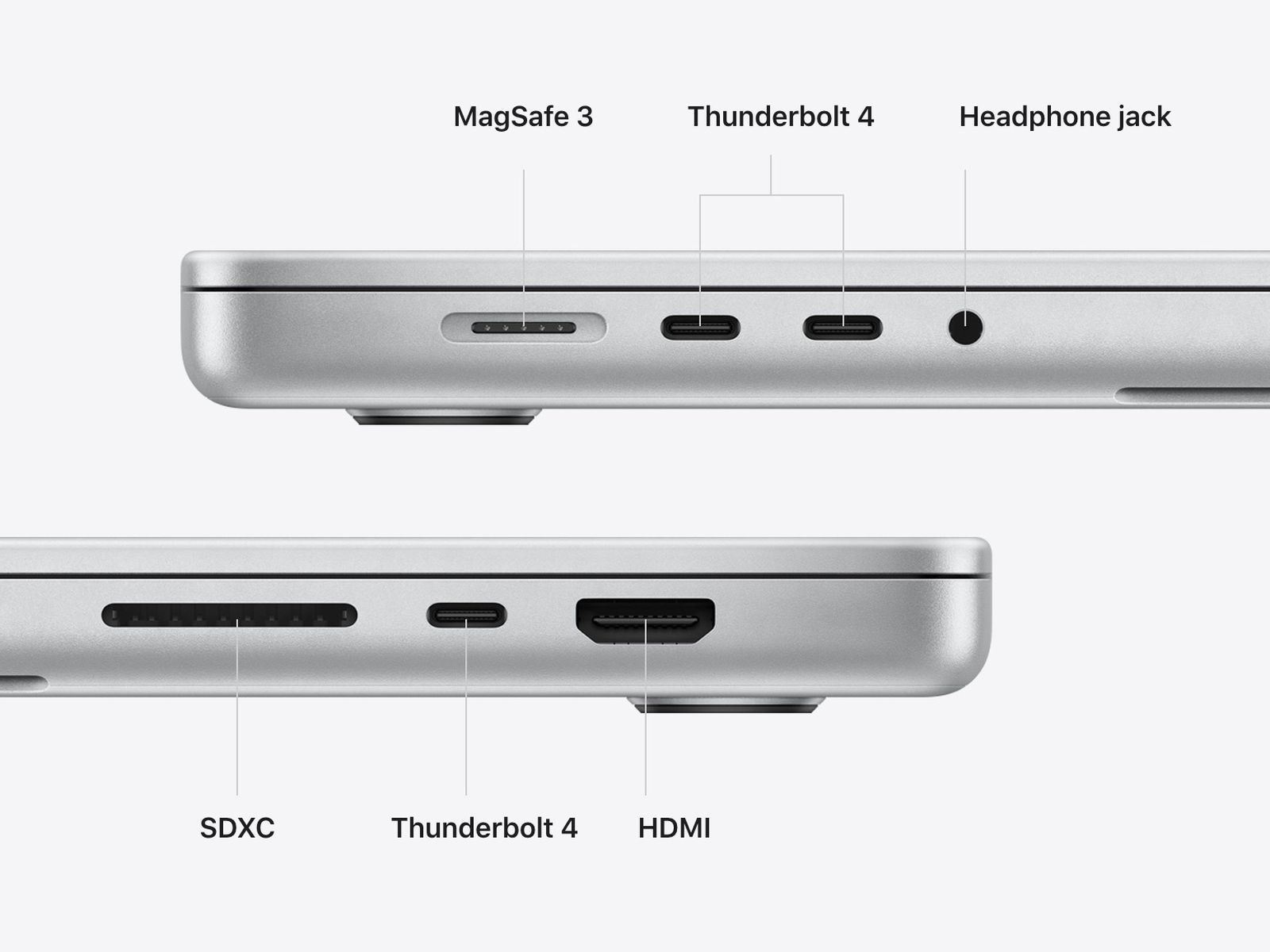
I don't think a MacBook Air M1 has a lot places to add ports [0]. The latest generation of MacBook Pros bring a lot of the ports back [1], so that point doesn't hold anymore.
Also, of all the MacBook Air users I know, I'm the heaviest user in terms of processor load, and given that it's the company computer, it wouldn't be my first choice for a personal MacBook (in fact, I have a personal MacBook Pro).
At the end of the day, having a featherweight computer which can do all my work related tasks and some heavier stuff and doesn't needs its charger and ports most of the time is really a spoiling thing. However, for heavy development and photographic work, nothing beats on board ports and a bigger screen.
[0]: https://www.apple.com/v/macbook-air/n/images/specs/mba_charg...
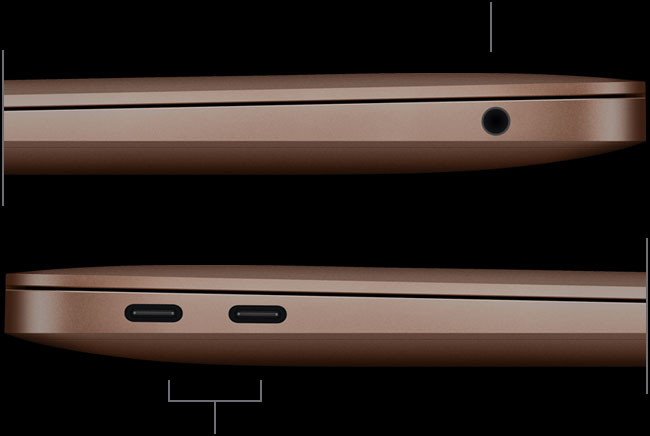
[1]: https://images.macrumors.com/t/MsiVifkTbdhdqh2z2tvJZXIuH80=/...
moduspol
They do--they just include the monitor as part of it. That seems to have been the vision since at least 2011 [1].
btgeekboy
That was discontinued over 6 years ago. In 2022, it isn't a great monitor, either.
moduspol
They do have a replacement consumer monitor in 2022 [1], but in the meantime, they were selling and supporting the LG UltraFine 5K [2].
I haven't bought the new studio display, but the Thunderbolt Display was great and the LG UltraFine 5K is, too. Used both as daily drivers (and docking stations) for years. I only haven't bought the new one because that LG one is still going strong.
Regardless: my point is that this certainly seems to be "the vision." You don't need a docking station because your monitor functions as one. If I had to guess, they probably think normal people don't want to buy a docking station and then deal with a series of poorly-integrated peripherals.
[1] https://www.apple.com/shop/buy-mac/apple-studio-display/stan... [2] https://support.apple.com/en-us/HT210205
smoldesu
I actually agree. Normally I'm against proprietary ports, but vendors that have done this in the past have traditionally killed a lot of birds with one stone. Both Dell and Lenovo's docking solutions are fantastic, and don't require expensive hardware to manufacture docks. As a result, you can get the full IO of your computer extended to a dock with 10+ ports for less than $30. Pretty great solution IMO.
zamadatix
The downside is all of the hardware ends up inside the laptop where you still pay for it and now can't upgrade it separately or reuse it with another laptop. Not that I ever remember Dell/Lenovo docks being $30 new anyways.
smoldesu
Yeah, I don't think I'd ever call it a perfect solution. FWIW though, I think most of the implementations I've seen leverage the preexisting I/O controllers on the laptop itself, which means the only added cost is whatever the proprietary docking connector costs on the BOM.
somethoughts
I remember I did receive a Dell dock complete with a spring mounted adapter for the actual laptop.
I wasn't thinking that though - I was thinking something like the ones reviewed in the article but perhaps with a Apple Thunderbolt connector to prevent them from having to support Windows PC users.
tinus_hn
And if one of the tiny wires breaks and causes a short, not only can you cause a fire but you also damage the connector in the laptop which can only be fixed by replacing the motherboard, which is more expensive than the laptop itself and not covered by warranty.
tossoutaccimade
Totally agree. I keep a dock for my thinkpad t420 hooked up to 2 27" 1440p iMacs in target display mode. Pop it in, the imacs get my laptop's workspaces. I keep a dell laptop docked to my tv as a streaming box. Both of these setups give me no trouble, and all of these things were being thrown out by my university.
rhinoceraptor
Technically they have one, it's built into the displays. Obviously it's not a great solution if you want to use your existing monitors.
Roritharr
7 years ago I wrote a comment, dismayed about the coming USB-C insanity and was made fun of.
Here we are.
djur
The problem here isn't related to the standardized port and incompatibility between devices, though, is it? It's a matter of the functionality of the hardware in the peripheral, which has been an issue with USB hubs forever. Your comment is all about device compatibility, not devices being cheap and shitty.
Roritharr
One begets the other is my implied argument, if the standard wouldn't be this wide and allow for so much missing functionality, devices being this cheap and shitty would stick out more. Overall prices would be higher, but the quality per device would increase, even if just for economy of scale reasons.
How many bad USB 2 Hubs did you have to deal with?
Dylan16807
What missing functionality?
When chips die, that's not something the standard could affect.
When a USB to Ethernet converter happens to be on the same circuit board as an actual hub, the USB standard isn't responsible for the Ethernet part.
The screen connections are pretty much just passthrough. That's the narrowest you can get.
And it doesn't sound like the USB ports on the hubs had any problems.
If you split things up by standard, you'd have a USB hub that always works, with a flaky ethernet converter plugged in one port and a flaky HDMI converter plugged in another port.
djur
This has nothing to do with USB 3 or USB-C, though. The same shortcomings were true of previous USB standards, it just was rarely feasible to run so many different peripherals through a single hub.
tempnow987
Haha... That's pretty perfect. And after 7 years I'm also still playing with stuff.
I got a hub with an external power connector that plugs into wall and it charges my iphone at trickle charger rates.
Meanwhile my "crappy" apple charger seems to blast my iphone up in no time.
One cost me MORE (the hub/dock).
smoldesu
This just in! Accessory designed for use with phone works well with phone, while off-the-shelf generic accessory does not. More at 11.
tempnow987
We have been told, repeatedly, about the "next great thing" in standards. The EU mandated micro-USB (ugh!). 7 years ago we were being hyped up about USB-C.
Here we are 7 years later, and the SAME lighting cable apple has had for 10 years (!!) is more sturdy, has great low latency (if you compare to USB-C for music making the difference is crazy), has fantastic reliable power delivery.
I mean, after 10 years you'd think the new standards would be absolutely crushing Apple's old tech.
But I can't get the low latency on USB-C for audio I get on lighting (anyone know why? Both are wires) 10+ years later.
It's maddening. And the power delivery and speeds of USB-C/USB3 are just crazily all over the map. You can plug into a blue USB3 port and go no faster than you did on an old port!
spicybright
See you again in 7 years! :(
Galaxeblaffer
This runs much much deeper than just USB-C hubs. Me and a couple of friends dabbled in getting a product produced in China 10 years ago and while investigating competition and really digging deep into aliexpress, alibaba etc. We found out that almost every single brand who doesn't own their own production is like this, and that's almost every single one. To name a few this same thing is true for Golf balls, pillows, every imaginable electronic peripherals, clothing, tools. We got to a point where my colleague was able to sniff down the original product/manufacturer for every single product we researched. Is this good or bad? idk, all i know is that this is how the world works these days..
Get the top HN stories in your inbox every day.
If you want a decent dock you have to spend a bit of money. I went through this pain before accepting the cost and buying a CalDigit Thunderbolt 4 Element Hub[1]. Run's two 4k displays at 60Hz, any peripheral and charges my laptop.
So good I bought a second.
1. https://www.caldigit.com/thunderbolt-4-element-hub/